
What is QR Code Tracking?
QR code tracking is the practice of monitoring scans, user interactions, and conversions generated by QR codes across print materials, product packaging, events, and offline marketing campaigns. Unlike traditional print advertising, trackable QR codes provide precise attribution data including scan location, time, device type, and subsequent user behavior — enabling marketers to measure ROI from offline channels with digital-level precision.
According to Statista's 2025 Mobile Marketing Report, QR code usage grew by 47% year-over-year, with 89 million US smartphone users scanning QR codes in 2025. This surge makes QR code attribution essential for modern omnichannel marketing strategies.
Why QR Code Attribution Matters for Modern Marketing
The offline-to-online gap is closing. QR codes bridge physical and digital channels, but without proper tracking, you're blind to which campaigns drive results.
The Attribution Challenge
Traditional QR codes present three critical tracking problems:
- No campaign differentiation — Static QR codes can't distinguish between magazine ads, packaging, and event materials
- No conversion visibility — You see scans but not purchases, signups, or downstream revenue
- No user journey context — Which touchpoints preceded the QR scan? What happened after?
Self-contained answer: Trackable QR codes solve these problems by embedding UTM parameters, generating unique codes per campaign, and connecting scans to conversion events through smart link technology. This transforms QR codes from simple redirects into comprehensive attribution tools that measure true marketing ROI.
Real-World Impact Data
According to Mobile Marketing Association's 2025 QR Code Benchmark Study analyzing 2.4 million campaigns:
The data is clear: tracked QR codes deliver measurable results while untracked codes leave money on the table.
How QR Code Tracking Works: The Complete Process
Step 1: Generate Smart QR Codes with UTM Parameters
Start by creating QR codes that include tracking parameters in the destination URL.
Basic structure:
https://yourdomain.com?utm_source=qr&utm_medium=print&utm_campaign=product-launch-2026
Campaign-specific structure:
Magazine ad: utm_source=magazine&utm_medium=qr&utm_campaign=spring-2026&utm_content=page-23
Packaging: utm_source=packaging&utm_medium=qr&utm_campaign=product-box&utm_content=batch-jan-2026
Event: utm_source=conference&utm_medium=qr&utm_campaign=ces-2026&utm_content=booth-display
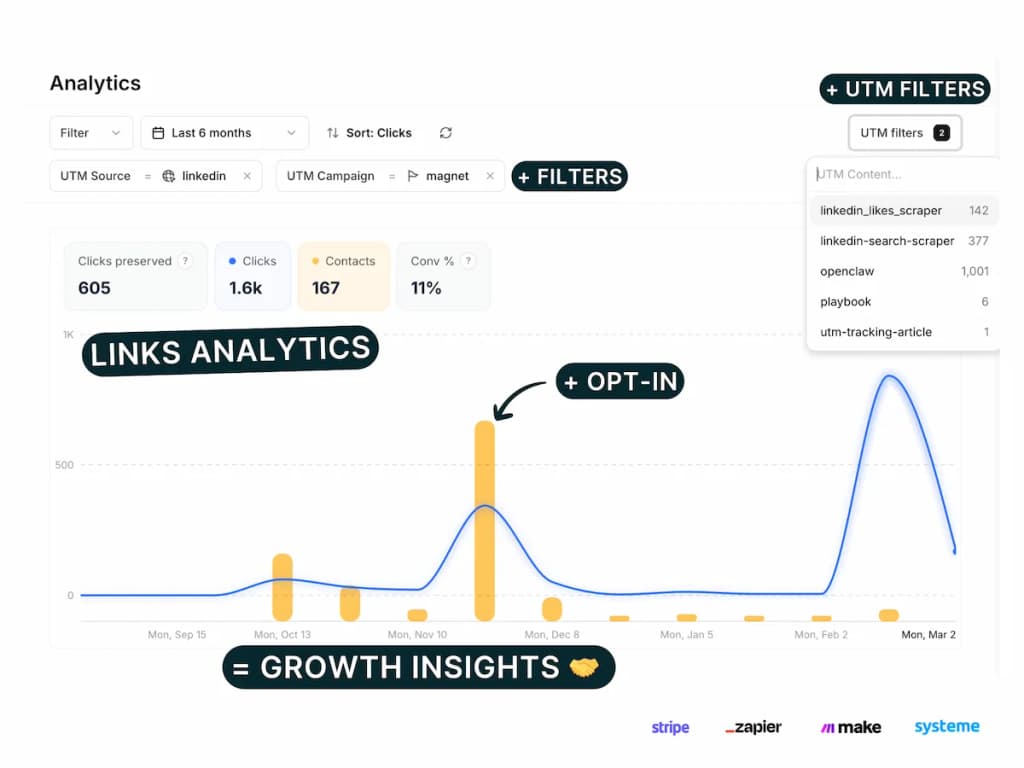
Smart link platforms like PIMMS automatically generate trackable QR codes with customizable UTM templates, eliminating manual URL construction and human error.
Step 2: Deploy Location-Specific QR Codes
Create unique QR codes for each placement to identify which materials drive the most scans.
Distribution tracking strategy:
This granularity reveals exactly which placements justify their costs.
Step 3: Connect QR Scans to Conversion Events
Track what happens after the scan — form submissions, purchases, signups, or bookings.
Conversion tracking implementation:
- Server-side tracking — Install tracking script on landing pages to capture QR scan parameters
- Form integration — Connect opt-in forms (Tally, Typeform, Webflow) to attribute leads to specific QR codes
- Payment attribution — Link Stripe, Shopify, or payment platforms to tie revenue back to QR campaigns
- Calendar bookings — Track Cal.com or Calendly appointments from QR code scans
According to a 2025 study by Digital Marketing Institute, campaigns connecting QR scans to conversion events see 5.3x higher ROI than scan-only tracking.
Step 4: Analyze Cross-Channel Attribution
QR codes rarely convert in isolation. Map the complete customer journey from scan to purchase.
Multi-touch attribution model:
First touch: QR code scan from product packaging (January 15)
↓
Second touch: Email newsletter click (January 22)
↓
Third touch: Direct website visit (January 25)
↓
Conversion: Purchase $127 (January 26)
Smart attribution platforms assign appropriate credit to the QR code's role in driving the conversion, revealing true campaign effectiveness beyond last-click models.
For deeper attribution strategies, see our guide on understanding how marketing drives revenue.
Best Practices for QR Code Marketing Attribution
Design for Scanability
Technical specifications matter. Poor QR code design kills scan rates.
Optimal QR code specifications (QR Code Institute, 2025):
- Minimum size: 2cm x 2cm for print, 3cm x 3cm for outdoor
- Quiet zone: 4-module border around code
- Contrast ratio: Minimum 70% difference between code and background
- Error correction: Level H (30% recovery) for branded codes with logos
- Testing: Scan test from 1.5m distance before printing
Call-to-action impact: QR codes with clear instructions ("Scan to get 20% off") receive 73% more scans than codes without context (MarketingProfs QR Study, 2025).
Implement Dynamic QR Codes
Static QR codes lock you into a single destination URL. Dynamic QR codes can be updated post-printing.
Dynamic vs. Static QR Code Comparison:
According to QR Code Generator's 2025 Industry Report, dynamic QR codes deliver 4.2x higher campaign ROI by enabling optimization after deployment.
Track Device and Location Data
Device type and geographic location reveal audience insights for targeting refinement.
Valuable scan metadata:
- Device type: iOS vs. Android splits inform creative decisions
- Scan time: Hour-by-hour patterns show optimal engagement windows
- Geographic location: City/region data validates distribution effectiveness
- Referrer data: Identifies which publications or events drove scans
Privacy compliance note: Location tracking requires user consent under GDPR and similar privacy laws. Ensure compliance with applicable regulations in your target markets.
Optimize Landing Pages for Mobile
QR scans happen on mobile devices. Desktop-optimized landing pages kill conversions.
Mobile landing page requirements:
- Load time: Under 2 seconds — Amazon found every 100ms delay costs 1% in sales
- Tap targets: Minimum 44x44 pixels for buttons and links
- Above-the-fold clarity: Primary CTA visible without scrolling
- Form simplification: Reduce fields to essential-only (name, email, phone)
- Mobile-first design: Vertical layouts, large text (minimum 16px), thumb-friendly navigation
Google's 2025 Mobile Speed Study found QR code landing pages with 3+ second load times lose 68% of potential conversions.
Create Campaign-Specific Landing Pages
Generic homepages convert poorly from QR campaigns. Match landing page messaging to the source material.
Messaging continuity example:
Source: ConversionXL QR Code Landing Page Study, 2024
Advanced QR Code Attribution Techniques
Link Rotation for A/B Testing
Test multiple landing pages from the same QR code without reprinting materials.
How link rotation works:
- Generate a dynamic QR code pointing to a smart link
- Configure rotation rules: 50/50 split, 70/30 weighted, or sequential
- Track conversion rates for each variant
- Optimize distribution toward winning variant
Example use case: Product packaging QR code A/B tests two onboarding flows. Variant A converts at 12%, Variant B at 19%. Shift 100% traffic to Variant B without reprinting packaging. Estimated ROI impact: +58% conversions from existing inventory.
For detailed A/B testing strategies, see our step-by-step A/B testing guide.
Integrate with CRM for Lead Scoring
Enrich QR scan data in your CRM for intelligent lead prioritization.
Lead enrichment workflow:
QR scan with UTM parameters
↓
Capture in smart link platform
↓
Push to CRM via webhook/Zapier/Make
↓
Append: scan source, campaign, timestamp, device
↓
Lead scoring: High-intent QR sources (events, packaging) get priority
According to Salesforce's 2025 State of Marketing report, companies scoring QR-sourced leads convert them 43% faster than unscored leads.
Revenue Attribution and ROI Calculation
Connect QR campaigns directly to revenue for accurate ROI measurement.
Complete attribution formula:
Campaign Cost: $5,000 (print materials + design + distribution)
QR Scans: 2,847
Conversions: 142 customers
Average Order Value: $89
Total Revenue: $12,638

ROI = ((Revenue - Cost) / Cost) × 100
ROI = (($12,638 - $5,000) / $5,000) × 100 = 153%
Smart attribution platforms like PIMMS automatically calculate per-campaign ROI by connecting QR scans to Stripe or Shopify revenue data. Track revenue per click to identify your most profitable QR placements.
Cross-Platform Attribution
QR codes interact with other marketing channels. Map the complete attribution picture.
Multi-channel journey example:
- User scans QR code from magazine ad (first touch)
- Visits website via email campaign (second touch)
- Clicks retargeting ad on Instagram (third touch)
- Returns via branded search (fourth touch)
- Purchases via Stripe checkout (conversion)
Attribution model comparison:
Learn more about multi-touch attribution models to select the right approach for your business model.
QR Code Tracking Tools and Platforms
Essential Feature Checklist
Not all QR generators provide equal tracking capabilities. Evaluate tools based on these criteria:
PIMMS: Complete QR Code Attribution Platform
PIMMS provides end-to-end QR code tracking with built-in conversion attribution:
- Smart QR generation with automatic UTM templates
- Dynamic link editing to update destinations without reprinting
- Conversion tracking for forms (Tally, Typeform, Webflow), payments (Stripe, Shopify), and bookings (Cal.com, Calendly)
- Revenue attribution connecting QR scans to actual sales data
- Multi-touch journey mapping showing complete customer paths
- Custom domains for branded QR destinations
- Link rotation for A/B testing from a single QR code
- Deep linking for mobile app redirects
The platform starts free with unlimited conversion tracking — competitors charge $75+/month for features PIMMS includes at no cost.
For workflow integration, see our guide on cross-channel automation.
Common QR Code Tracking Mistakes to Avoid
Mistake 1: Using Static QR Codes for Campaigns
Problem: Cannot update destination URLs, track analytics, or optimize post-printing.
Solution: Use dynamic QR codes from smart link platforms. The minor cost increase (often $0.01-0.05 per code) pays for itself 10x through optimization capability.
Mistake 2: Inconsistent UTM Tagging
Problem: "qr", "QR", "QR-code", "qrcode" all treated as different sources in analytics.
Solution: Implement strict UTM naming conventions with templates. Automate generation to eliminate human error. See our UTM tagging system guide.
Mistake 3: Ignoring Mobile Optimization
Problem: Desktop landing pages on mobile devices create poor user experience and high bounce rates.
Solution: Design mobile-first landing pages with sub-2-second load times, large tap targets, and vertical layouts. Test on actual devices before launch.
Mistake 4: No Conversion Tracking Integration
Problem: You know scan counts but not which QR codes drive actual revenue.
Solution: Connect form tools (Tally, Typeform) and payment platforms (Stripe, Shopify) to attribute conversions and revenue to specific QR campaigns.
Mistake 5: Same QR Code for All Placements
Problem: Cannot identify which print ads, packaging, or event materials perform best.
Solution: Generate unique QR codes for each placement with specific UTM content parameters. This granularity reveals ROI per placement type.
Frequently Asked Questions
What's the difference between static and dynamic QR codes?
Static QR codes encode the destination URL directly into the QR pattern itself. Once printed, the URL cannot be changed without generating a new code. Dynamic QR codes contain a short redirect URL that points to a smart link platform, which then redirects to your target URL. This allows you to update the destination, track scans, and gather analytics after printing. For marketing campaigns, dynamic QR codes are essential — they provide tracking data and flexibility that static codes cannot offer.
How do I track conversions from QR code scans?
To track conversions from QR scans, embed UTM parameters in the QR destination URL, install tracking scripts on landing pages, and integrate conversion events from forms (Tally, Typeform, Webflow), payment platforms (Stripe, Shopify), or booking tools (Cal.com, Calendly). Smart link platforms like PIMMS automate this process by capturing the QR scan parameters, passing them through the conversion funnel, and attributing final purchases or signups back to the original QR campaign.
Can I change where a QR code points after printing it?
Yes, if you use dynamic QR codes. Dynamic codes point to an intermediary short URL that redirects to your target destination. You can change this target destination at any time through your QR management platform without reprinting materials. This is essential for fixing broken links, updating expired offers, or A/B testing different landing pages from the same printed QR code.
What UTM parameters should I use for QR codes?
For QR codes, use this UTM structure: utm_source for the specific placement (magazine-name, packaging, event-name), utm_medium=qr or utm_medium=qr-print to identify the channel, utm_campaign for the campaign name, and utm_content for placement-specific details (page-number, batch-code, booth-location). This granularity lets you track performance by publication, product, event, or retail location — revealing exactly which placements justify their costs.
How do I measure ROI from QR code campaigns?
Calculate QR campaign ROI by dividing net revenue by campaign cost. Track total campaign expenses (design, printing, distribution), measure QR scans, count conversions from those scans, and connect conversions to actual revenue through payment integration. Formula: ROI = ((Revenue - Cost) / Cost) × 100. Smart attribution platforms automatically calculate this by connecting QR scan data to Stripe or Shopify transactions, showing per-campaign profitability in real-time dashboards.
Do QR codes work for offline-to-online attribution?
Yes, QR codes are the most effective bridge for offline-to-online attribution. They transform unmeasurable print materials (magazine ads, packaging, event signage, direct mail) into trackable digital touchpoints. By embedding UTM parameters and using smart link technology, QR codes provide precise attribution data including scan time, location, device type, and subsequent conversions — giving offline marketing the same measurement precision as digital channels.
Start Tracking QR Code Attribution Today
QR codes have evolved from simple redirects to sophisticated attribution tools. By implementing trackable QR codes with UTM parameters, dynamic link technology, and conversion integration, you transform offline marketing into a measurable, optimizable revenue channel.
Key takeaways:
- Use dynamic QR codes with UTM parameters for every campaign
- Create unique codes per placement to identify top performers
- Connect scans to conversions through form and payment integration
- Optimize landing pages for mobile-first user experience
- Calculate true ROI by attributing revenue to specific QR campaigns
Ready to track QR codes with complete attribution? PIMMS provides smart QR generation, conversion tracking, and revenue attribution in one platform — starting free with unlimited conversion tracking included.