Rebrandly has built a strong reputation for branded link management. Custom domains, clean dashboards, link galleries, and AI scheduling make it a popular choice for marketing teams who care about brand consistency and high link throughput.
But if you're trying to connect clicks to actual revenue — or optimize for mobile app conversions — Rebrandly might not be the right fit. Rebrandly focuses entirely on branded short links at scale. It does not offer conversion tracking, sales tracking, Stripe integration, server-side tracking, deep linking, UTM builder, or opt-in form tracking on any plan.
Here's an honest, side-by-side comparison so you can choose the tool that matches your goals.
What is Rebrandly?
Rebrandly is a branded link management platform founded in 2015, based in Rome. It focuses exclusively on custom domain link shortening and brand consistency across marketing channels. The platform serves marketing teams, agencies, and enterprises who want links that look like links.yourbrand.com/campaign instead of generic short URLs.
Rebrandly excels at:
- Link galleries — Build branded link-in-bio pages (similar to Linktree) with your own domain
- More links per month on lower plans — Professional at $14/mo gives 1,500 links; Essentials at $11/mo gives 250
- More custom domains — Growth and Enterprise tiers scale domains significantly
- Traffic routing — Send visitors to different destinations based on geography or device (Professional+)
- AI scheduling — Suggestions for optimal posting times (Essentials+)
- Team collaboration — Multiple users, workspaces, and organization features
- QR codes — Generate branded QR codes tied to your short links
The platform does not offer revenue attribution, conversion tracking, sales tracking, Stripe integration, server-side tracking, deep linking, UTM builder, or opt-in form tracking. Analytics focus on clicks, geography, device, and referrer — not sales or conversions.
Rebrandly is a solid choice if your main goal is brand consistency and high link throughput. If you need to answer "which campaign drove this sale?" or "which influencer link converted?" — Rebrandly cannot do that.
What is PIMMS?
PIMMS is an open-source link management platform (GitHub) built for revenue attribution and conversion tracking. Unlike traditional link shorteners that stop at click analytics, PIMMS connects every link to actual business outcomes: Stripe payments, form submissions, and signups.
PIMMS differentiators:
-
Conversion tracking ecosystem — FREE — Conversion tracking, unlimited sales tracking, Stripe integration, and opt-in form tracking are included on every plan, including Free. Rebrandly has none of this at any price.
-
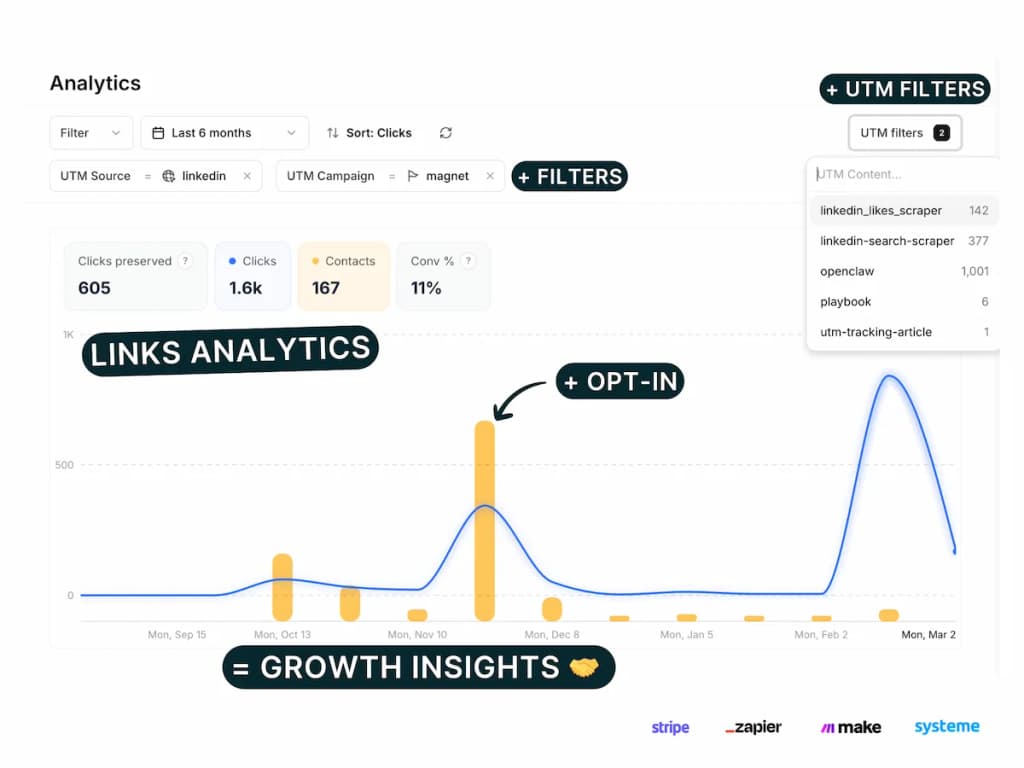
Professional UTM management — UTM link builder, templates (3 on Free), filter/sort/group by UTM, saved parameters (10 on Free). Pro+ adds UTM naming conventions. Rebrandly has no UTM builder.
-
Social-media deep linking on all plans — Smart links that open directly inside native social apps (Instagram, YouTube, TikTok, Amazon, Vinted, etc.) instead of the browser. Included on Free. This is different from app deep linking (redirecting to your own iOS/Android app). Rebrandly has neither type of deep linking.
-
Server-side tracking — Analytics work even when users have ad blockers. Rebrandly relies on client-side tracking.
-
Lifetime pricing — Pay once on Tiny (€79) or Solo (€129) instead of subscribing forever.
PIMMS does not offer link galleries (bio pages) or AI scheduling. It's optimized for founders, growth marketers, and e-commerce teams who need to prove ROI.
Feature comparison: what Rebrandly lacks
Rebrandly has zero support for the following features — on any plan:
Opt-in form integration ecosystem
PIMMS includes a tracking opt-in form and dedicated setup guides for connecting your forms and booking tools to conversion tracking. Rebrandly has no equivalent — no conversion tracking, no form attribution, no sales tracking on any plan.
Platforms with dedicated PIMMS guides:
- Stripe — Track payments and revenue from Stripe Checkout and Payment Links
- Tally — Native integration and webhook setup for Tally forms
- Cal.com — Direct webhook and Zapier integration for bookings
- Calendly — Meeting and booking conversion tracking
- Brevo — Forms and meeting conversions
- Webflow — Form submissions and lead capture
- Framer — Form tracking on Framer sites
- Elementor — WordPress/Elementor form leads
- Systeme.io — Sales and lead attribution
- Podia — Stripe payments via Podia
- iClosed — CRM and Zapier integration
Plus 100+ more via Zapier and Make — including Typeform, Google Forms, HubSpot, Notion, Airtable, and most no-code tools.
If you run opt-in forms, demos, or booking flows, PIMMS can attribute each conversion back to the link that drove it. Rebrandly cannot.
Professional UTM campaign management
Most link tools offer a basic UTM builder at best. PIMMS treats UTM management as a first-class feature — the kind of thing teams usually pay $19–$159/month for on UTM.io or manage manually in Google Sheets.
What PIMMS includes on all plans (including Free):
- UTM link builder — Visual editor to build UTM-tagged links without manual URL crafting
- UTM templates — Save reusable UTM parameter sets and apply them to new links in one click (3 on Free, unlimited on paid plans)
- Saved UTM parameters — Pre-fill values from saved lists so your team always uses the correct sources, mediums, and campaigns (10 on Free, unlimited on paid plans)
- Filter, sort & group by UTM — Slice your analytics by any UTM parameter: source, medium, campaign, term, content. See which combinations drive the most clicks, conversions, and revenue
- Bulk UTM builder — Paste multiple URLs or import CSV, apply one or multiple templates, and generate dozens of tracked links in seconds
- CSV export — Export all links and UTM data for reporting or backup
On Pro+ (€39/mo):
- UTM conventions — Require, lock, hide, and validate UTM parameters. Enforce consistent naming taxonomy across your entire team. No more "facebook" vs "Facebook" vs "fb" in your reports
- UTM rules — Define which parameter values are allowed, required, or locked per campaign type
This replaces both UTM.io ($19–$159/mo for similar features) and the Google Sheets tracking plans many teams still rely on. If you run more than a handful of campaigns, proper UTM management saves hours per week and eliminates reporting inconsistencies.
Rebrandly has no UTM builder at all — no templates, no saved parameters, no conventions, and no way to build or manage UTM-tagged links within the platform.
Pricing side by side (verified February 2026)
Prices below come from each product's official pricing page.
Rebrandly plans
Key features by plan:
- Free: Custom back-halves, 1 link gallery, unlimited clicks
- Essentials: 10K audience data, 3 link galleries, AI scheduling
- Professional: 25K analytics, 50 password-protected links, 2 workspaces, 2 teammates, traffic routing, link expiration
- Growth: Higher limits
- Enterprise: Highest tier
PIMMS plans
What jumps out immediately:
- Rebrandly gives more links per dollar on mid-tier plans. Professional at $14/mo gets 1,500 links vs PIMMS Solo at €19/mo with 500 links.
- Rebrandly has zero conversion or revenue tracking at any tier. No Stripe, no sales attribution, no opt-in form tracking. PIMMS includes all of this from Free.
- Rebrandly has no deep linking at any tier. Links open in the browser. PIMMS includes smart app routing on every plan, including Free.
- Rebrandly has no UTM builder. PIMMS includes UTM templates, saved parameters, and filter/sort/group by UTM on all plans.
- PIMMS offers lifetime pricing on Tiny (€79) and Solo (€129). Rebrandly is subscription-only.
- Rebrandly has link galleries (bio pages) and AI scheduling. PIMMS doesn't offer bio pages.
- PIMMS has server-side tracking — ad blockers don't break your analytics. Rebrandly relies on client-side tracking.
Where Rebrandly wins
- Link volume per dollar — Professional at $14/mo (or $9/mo annual) gives you 1,500 links. PIMMS Solo at €19/mo gives 500. If you create hundreds of links per month and don't need conversion data, Rebrandly is more cost-effective.
- Link galleries (bio pages) — Rebrandly lets you build branded link-in-bio pages. PIMMS doesn't offer this.
- AI scheduling — Rebrandly suggests optimal posting times. PIMMS doesn't have this feature.
- More custom domains — Rebrandly scales domains across Growth and Enterprise. PIMMS maxes at 10 on Business.
- Enterprise focus — Rebrandly has built for larger teams and agencies with multi-brand workflows.
Where PIMMS wins
- Revenue and conversion tracking — The biggest gap. Rebrandly tells you how many people clicked. PIMMS tells you which click turned into a Stripe payment or form submission. No Rebrandly plan offers native revenue attribution.
- Social-media deep linking — Open links directly in Instagram, YouTube, TikTok, Amazon, and more. Rebrandly doesn't offer this at any tier.
- Professional UTM campaign management — UTM link builder, templates, saved parameters, filter/sort/group by UTM, bulk generation, and (on Pro+) naming conventions and rules. Replaces UTM.io and Google Sheets tracking. Rebrandly has no UTM builder at all.
- Opt-in form ecosystem — Dedicated guides for 11+ platforms plus 100+ via Zapier/Make. Rebrandly has none.
- Server-side tracking — PIMMS tracks through server-side events, so ad blockers don't break your analytics.
- Lifetime pricing — Pay once, use forever. Tiny at €79 or Solo at €129. Rebrandly is subscription-only.
- Most features free — Conversion tracking, Stripe, server-side tracking, deep linking, UTM builder, opt-in forms, API (60 req/min), 100+ integrations — all on PIMMS Free.
When to choose Rebrandly
Rebrandly makes sense when:
- You need high link volume — You create 500+ links per month and want the best price per link. Rebrandly Professional at $14/mo (1,500 links) beats PIMMS on raw volume.
- Link galleries are core to your strategy — You run link-in-bio campaigns and need branded landing pages. Rebrandly has this; PIMMS doesn't.
- You don't need conversion or revenue data — You're fine with click counts, geography, and referrers. You're not trying to attribute sales to specific campaigns.
- You want AI scheduling — Rebrandly's posting-time suggestions matter to your workflow.
- You're brand-first, not conversion-first — Your priority is consistent branded links across channels, not proving ROI per campaign.
When to choose PIMMS
PIMMS makes sense when:
- You need revenue attribution — You sell via Stripe or similar and want to see which links drive actual sales. Rebrandly can't do this.
- You need conversion tracking — Form submissions, signups, bookings, and purchases tied to specific links. Rebrandly has none of this.
- Mobile app conversion matters — You share links on Instagram, TikTok, YouTube, or in apps. Deep links that open in the native app reduce friction and improve conversion.
- You need UTM management — Templates, saved parameters, filter/sort/group by UTM. Rebrandly has no UTM builder.
- You run opt-in forms or booking flows — PIMMS has guides for Stripe, Tally, Cal.com, Calendly, Brevo, Webflow, Framer, Elementor, Systeme.io, Podia, iClosed, and 100+ more.
- You prefer lifetime pricing — You'd rather pay once (€79 or €129) than subscribe monthly.
- Ad blockers are a concern — Server-side tracking means your analytics work even when users block scripts.
Summary: two different philosophies
Rebrandly is built for branded link management at scale. It excels at volume, link galleries, AI scheduling, team collaboration, and enterprise workflows. If your goal is consistent branding and high link throughput, Rebrandly delivers. It does not do conversion tracking, revenue attribution, deep linking, or UTM management — by design.
PIMMS is built for revenue attribution and conversion optimization. It excels at connecting clicks to sales, deep linking for mobile, UTM management, opt-in form tracking, and server-side tracking. If your goal is to prove marketing ROI and optimize for conversions, PIMMS delivers.
Neither tool is universally better. Choose based on what you need: volume and branding (Rebrandly) or conversion and revenue tracking (PIMMS).
Key takeaways
The bottom line: Rebrandly is a branded link manager. PIMMS is a conversion and revenue attribution platform. They overlap on short links and custom domains, but they're built for different jobs.
FAQ
Does Rebrandly have revenue tracking?
No. Rebrandly does not offer revenue attribution, conversion tracking, sales tracking, or Stripe integration at any tier. You get click analytics (geography, device, referrer) but not sales or conversion data. PIMMS includes conversion and sales tracking on every plan, including Free.
Does Rebrandly have deep linking?
No. Rebrandly links open in the web browser. There is no native app routing (e.g., opening YouTube links in the YouTube app). PIMMS includes deep linking on every plan, including Free.
Does Rebrandly have a UTM builder?
No. Rebrandly does not offer UTM link builder, templates, or saved parameters. PIMMS includes UTM builder with templates (3 on Free) and saved parameters (10 on Free) on all plans.
Does Rebrandly have opt-in form tracking?
No. Rebrandly has no conversion tracking or form attribution on any plan. PIMMS has dedicated guides for Stripe, Tally, Cal.com, Calendly, Brevo, Webflow, Framer, Elementor, Systeme.io, Podia, iClosed, and 100+ more via Zapier and Make.
Is Rebrandly cheaper than PIMMS?
It depends. For raw link volume, Rebrandly Professional ($14/mo, 1,500 links) gives more links per dollar than PIMMS Solo (€19/mo, 500 links). For conversion-focused features, PIMMS has no Rebrandly equivalent — and PIMMS offers lifetime pricing (€79 or €129) which Rebrandly does not.
Why would I choose PIMMS over Rebrandly?
Choose PIMMS if you need: revenue attribution (Stripe), conversion tracking, opt-in form tracking, deep linking for mobile apps, UTM builder and templates, server-side tracking, or lifetime pricing. Rebrandly doesn't offer any of these on any plan.
Why would I choose Rebrandly over PIMMS?
Choose Rebrandly if you need: more links per dollar (1,500/mo at $14), link-in-bio galleries, AI scheduling suggestions, more custom domains, or a focus purely on branded link management without conversion or revenue data.
Can I use both Rebrandly and PIMMS?
Yes. Some teams use Rebrandly for high-volume branded links and link galleries, and PIMMS for conversion-critical campaigns (paid ads, influencer links, mobile app promotions) where revenue attribution matters. The tools serve different purposes and can complement each other.