Linktree and PIMMS are often mentioned together when people talk about "link tools" — but they solve fundamentally different problems. Linktree builds the page that hosts your links. PIMMS creates the links that track what happens after someone clicks.
Understanding this distinction saves you time, money, and confusion. Here's an honest comparison of both tools, when to use each, and why the best setup often includes both.
TL;DR: Linktree = the page. PIMMS = the tracking. Need a bio page? Use Linktree. Need revenue attribution? Use PIMMS. Need both? Use Linktree for the page and PIMMS links inside it. They're complementary, not competitors.
The core difference: page builder vs link tracker
Linktree is a link-in-bio page builder. You get a single URL (e.g. linktr.ee/yourname) that opens a custom landing page with multiple links, social icons, videos, embeds, and sometimes a shop. It's like a micro-site for your Instagram, TikTok, or LinkedIn bio. Creators, influencers, and brands use it because social platforms typically allow only one clickable link in your profile — Linktree lets you offer many. The focus is on presentation: themes, layouts, subscriber collection, and social integrations. Linktree is great for creators who need a beautiful link-in-bio page.
PIMMS is an open-source link tracking and revenue attribution platform (GitHub). You create short, tracked links that redirect users to destinations (your website, app store, product page) while measuring clicks, conversions, and revenue. It tells you which link, campaign, or post drove each sale. Founders, marketers, and growth teams use it because they need to connect marketing activity to business outcomes. The focus is on measurement: UTMs, Stripe attribution, A/B testing, and server-side tracking that works even with ad blockers.
They are complementary, not competitors. Linktree gives you the real estate. PIMMS gives you the intelligence.
Why this matters: If you're trying to decide "Linktree or PIMMS?" you're asking the wrong question. You might need one, the other, or both — depending on whether you need a bio page, revenue tracking, or both. This guide walks you through pricing, features, and real-world setups so you can choose the right tool (or combination) for your goals.
Pricing side by side (verified February 2026)
Linktree plans
Key features by plan:
- Free: Unlimited links, social icons/videos/embeds, essential analytics, SEO optimized, QR code, Linktree Shops, digital products
- Starter: Custom themes, own audience (subscriber collection), redirect links, social media scheduling
- Pro: Priority links, animated themes, custom backgrounds, advanced analytics, commerce links, email/SMS collection
- Premium: Custom CSS, priority support, analytics API
Important: Linktree is a bio page builder, not a link tracking tool. It does not offer conversion tracking, sales attribution, Stripe integration, UTM management, server-side tracking, deep linking, or opt-in form tracking. It excels at bio page design, social media scheduling, digital product sales, and embed content.
PIMMS plans
What stands out:
- Linktree Free is generous — unlimited links, essential analytics, QR code, and even digital product selling. PIMMS Free is more limited (5 links, 200 events, 1 domain) but includes conversion tracking, Stripe integration, deep linking, and server-side tracking.
- Linktree focuses on the page — themes, scheduling, subscriber collection. PIMMS focuses on the links — revenue attribution, A/B testing, webhooks.
- PIMMS has lifetime pricing — Tiny (€79) and Solo (€129) one-time. Linktree is subscription-only.
- Different pricing models — Linktree charges for page customization and social features. PIMMS charges for link volume and attribution features.
Feature comparison
Where Linktree wins
- Link-in-bio page — Linktree is the page. You get a polished, customizable micro-site with unlimited links, social icons, videos, and embeds. PIMMS doesn't build pages; it creates individual tracked links.
- Social media workflow — Scheduling posts, subscriber collection. If your workflow centers on social content and list-building, Linktree has you covered.
- Selling digital products — Linktree Shops lets you sell digital products directly from your bio page. PIMMS doesn't offer this.
- Unlimited links on Free — You can add as many links as you want on the free plan. PIMMS Free caps at 5 links per month.
- Ease of setup — Create an account, add links, customize the look, and you're done. No technical setup required.
Where PIMMS wins
- Conversion tracking ecosystem (free) — Connect clicks to Stripe sales. See which link, campaign, or post drove each purchase. Linktree has no revenue tracking at any price.
- Social-media deep linking — Links that open directly in Instagram, YouTube, TikTok, Amazon, and more. Linktree has no deep linking of any kind.
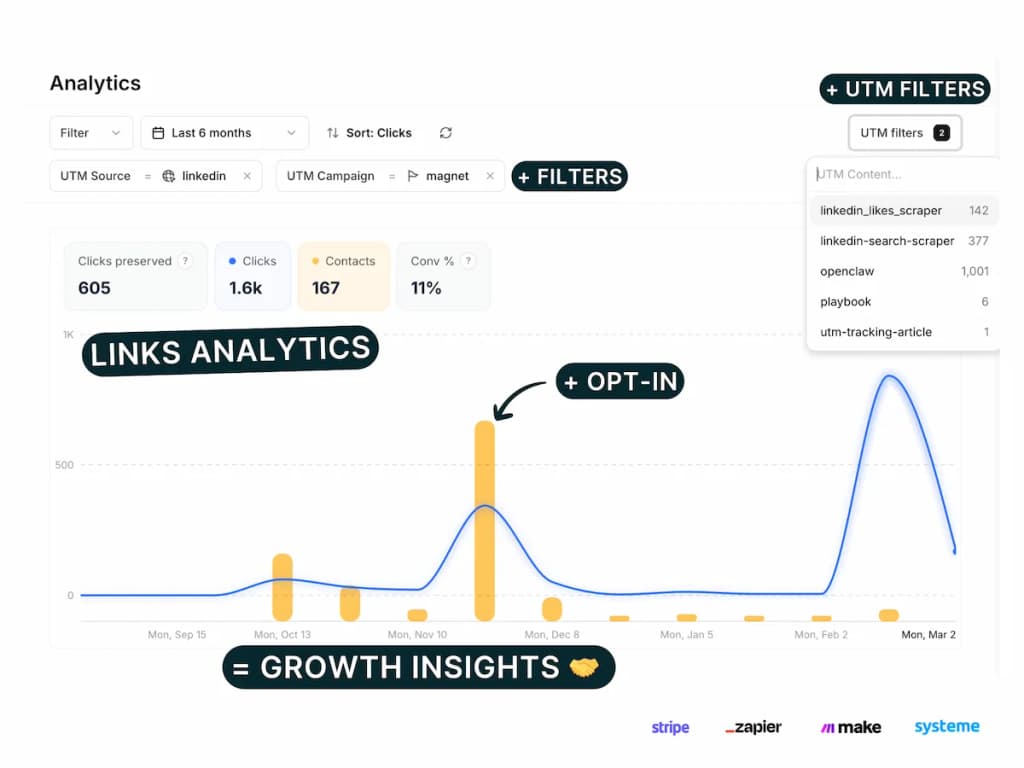
- Professional UTM campaign management — UTM link builder, templates, saved parameters, filter/sort/group by UTM, bulk generation, and (on Pro+) naming conventions and rules. Replaces UTM.io and Google Sheets tracking. Linktree has no UTM management at all.
- Server-side tracking — PIMMS tracks through server-side events, so ad blockers don't create blind spots. Linktree relies on client-side analytics.
- Opt-in form tracking — Dedicated guides for Stripe, Tally, Cal.com, Calendly, Brevo, Webflow, Framer, Elementor, Systeme.io, Podia, iClosed, plus 100+ via Zapier/Make. Linktree has none.
- A/B testing — Split-test destinations and measure which version converts better. Linktree doesn't offer this.
- Webhooks & API — Automate workflows, sync with CRMs, trigger actions on clicks. Linktree doesn't provide webhooks.
- Lifetime pricing — Pay once for Tiny (€79) or Solo (€129) and use the plan indefinitely.
PIMMS opt-in form tracking ecosystem
One of PIMMS's strongest differentiators is its conversion tracking ecosystem — available on every plan, including Free. If you use forms, booking tools, or payment platforms, PIMMS has dedicated setup guides for:
- Payments: Stripe, Podia
- Forms & leads: Tally, Brevo, Webflow, Framer, Elementor, Systeme.io
- Scheduling: Cal.com, Calendly, iClosed
- 100+ more via Zapier and Make
Linktree does not offer opt-in form tracking, conversion tracking, or sales attribution at any tier. You can collect subscribers (Starter+), but you cannot tie a specific link click to a sale or lead. PIMMS lets you attribute every conversion back to the link that drove it.
Professional UTM campaign management
Most link tools offer a basic UTM builder at best. PIMMS treats UTM management as a first-class feature — the kind of thing teams usually pay $19–$159/month for on UTM.io or manage manually in Google Sheets.
What PIMMS includes on all plans (including Free):
- UTM link builder — Visual editor to build UTM-tagged links without manual URL crafting
- UTM templates — Save reusable UTM parameter sets and apply them to new links in one click (3 on Free, unlimited on paid plans)
- Saved UTM parameters — Pre-fill values from saved lists so your team always uses the correct sources, mediums, and campaigns (10 on Free, unlimited on paid plans)
- Filter, sort & group by UTM — Slice your analytics by any UTM parameter: source, medium, campaign, term, content. See which combinations drive the most clicks, conversions, and revenue
- Bulk UTM builder — Paste multiple URLs or import CSV, apply one or multiple templates, and generate dozens of tracked links in seconds
- CSV export — Export all links and UTM data for reporting or backup
On Pro+ (€39/mo):
- UTM conventions — Require, lock, hide, and validate UTM parameters. Enforce consistent naming taxonomy across your entire team. No more "facebook" vs "Facebook" vs "fb" in your reports
- UTM rules — Define which parameter values are allowed, required, or locked per campaign type
This replaces both UTM.io ($19–$159/mo for similar features) and the Google Sheets tracking plans many teams still rely on. If you run more than a handful of campaigns, proper UTM management saves hours per week and eliminates reporting inconsistencies.
Linktree has no UTM management at all — no builder, no templates, no saved parameters, and no way to track or analyze campaigns by UTM parameters.
When to choose Linktree
Linktree is the right choice if:
- You need a link-in-bio page — You want one URL that opens a page with multiple links, social icons, and maybe videos. That's Linktree's core product.
- You're an influencer or creator — You care about subscriber collection, social scheduling, and selling digital products from your bio. Linktree is built for this.
- You want zero technical setup — Sign up, add links, pick a theme, done. No domains, no APIs, no integrations to configure.
- Engagement matters more than attribution — You want to know how many people visited your page and clicked links. You don't need to tie clicks to Stripe sales or specific campaigns.
- You sell digital products directly — Linktree Shops lets you sell from your bio.
When to choose PIMMS
PIMMS is the right choice if:
- You sell online — You want to know which link, campaign, or post drove each Stripe sale. Revenue attribution is PIMMS's strength.
- You share links on social — You want deep links that open in native apps (Instagram, YouTube, LinkedIn) instead of in-app browsers. PIMMS includes this on every plan.
- You run campaigns — You need UTM tracking, A/B testing, and webhooks to optimize which links convert. Linktree doesn't offer these.
- Ad blockers affect your data — Server-side tracking means PIMMS can capture events that client-side tools miss.
- You're budget-conscious — Lifetime pricing (€79 or €129) or lower monthly fees for advanced tracking. Conversion tracking is free on PIMMS.
- You already have a bio page — If you use Linktree, a custom website, or another page builder, PIMMS tracks the links inside that page.
Use them together: the best of both worlds
The most powerful setup often combines both tools. Smart marketers use both:
- Linktree as your bio page — Use Linktree for your Instagram, TikTok, or LinkedIn bio. One URL, multiple links, polished design.
- PIMMS links inside Linktree — Replace raw URLs with PIMMS smart links. When someone clicks "Book a demo" or "Shop now," they hit a PIMMS link that redirects and tracks the click.
- Revenue attribution — Connect PIMMS to Stripe. Now you know which Linktree link drove each sale, even though Linktree itself doesn't track revenue.
- Deep linking — PIMMS links can open in native apps. So a "Watch on YouTube" link in your Linktree opens the YouTube app instead of a browser.
- A/B testing — Use PIMMS to A/B test different destinations for the same Linktree button. Optimize without changing your Linktree page.
Example workflow: Your Linktree has buttons for "Book a demo," "Pricing," and "Latest video." Each button points to a PIMMS link. PIMMS tracks clicks, attributes Stripe sales to the right link, and can deep-link to your app or YouTube. Linktree gives you the page; PIMMS gives you the intelligence.
Setup steps: Create your Linktree page as usual. In PIMMS, create a smart link for each destination (demo booking, pricing page, YouTube video). Copy each PIMMS link URL and paste it into the corresponding Linktree button. Connect PIMMS to Stripe if you sell online. That's it — no code, no technical setup. Your Linktree page now has full attribution.
Concrete example: A SaaS founder uses Linktree for their LinkedIn bio. The page has three buttons: "Book a demo," "See pricing," and "Watch our latest video." Each button points to a PIMMS link. The demo link goes to Cal.com; the pricing link goes to their pricing page; the video link goes to YouTube. PIMMS tracks every click, adds UTM parameters, and when someone books a demo and later converts to a Stripe customer, PIMMS attributes that sale back to the "Book a demo" link. The founder now knows exactly which LinkedIn posts drove revenue — something Linktree alone cannot do.
Summary table
Conclusion
Linktree and PIMMS are not head-to-head competitors. Linktree builds the link-in-bio page; PIMMS tracks what happens after someone clicks. Choosing between them is the wrong question — the right question is: what do you need?
- Need a bio page? Linktree is the answer. It's great for creators who need a beautiful link-in-bio page.
- Need revenue attribution, deep linking, or campaign tracking? PIMMS is the answer. Conversion tracking is free; server-side tracking and UTM management are included on every plan.
- Need both? Use Linktree for the page and PIMMS links inside it. The combined cost is often lower than you'd expect, and you get the best of both tools.
Don't force one tool to do everything. Use each for what it does best, and you'll save time, money, and frustration.
FAQ
Are Linktree and PIMMS competitors?
No. They solve different problems. Linktree builds the link-in-bio page that hosts your links. PIMMS creates tracked links that measure clicks and revenue. They're complementary: use Linktree for your bio page, PIMMS links inside it for tracking.
Can I use PIMMS links inside my Linktree?
Yes. Replace any URL in your Linktree with a PIMMS smart link. When visitors click, they're redirected through PIMMS, which tracks the click and can attribute revenue. You get Linktree's page design with PIMMS's attribution.
Does Linktree track revenue or conversions?
No. Linktree tracks page views and link clicks. It does not connect clicks to Stripe or any payment platform. For revenue attribution, you need a tool like PIMMS.
Does Linktree support deep linking?
No. Linktree does not offer any form of deep linking. PIMMS includes social-media deep linking (opening links directly in YouTube, TikTok, Instagram, Amazon, etc.) on every plan, including Free.
Does PIMMS offer conversion tracking on the free plan?
Yes. PIMMS includes conversion tracking, Stripe integration, opt-in form tracking, server-side tracking, and deep linking on the free plan. Linktree does not offer any of these at any price.
Which is better for influencers?
Linktree is better if you need a polished bio page, subscriber collection, social scheduling, and digital product selling. PIMMS is better if you need to know which links drive revenue (e.g. affiliate links, product links). Many influencers use both: Linktree for the page, PIMMS for the links that matter for revenue.
Which is better for SaaS founders?
PIMMS. SaaS founders typically need revenue attribution (which link drove this Stripe sale?), UTM tracking, A/B testing, and deep linking. Linktree doesn't offer these. You might still use Linktree (or a custom page) for your bio, but PIMMS tracks the links.
What's PIMMS lifetime pricing?
PIMMS Tiny is €79 one-time (100 links/mo, 1 custom domain, 1 year retention). PIMMS Solo is €129 one-time (500 links/mo, 3 domains, Stripe sales tracking, A/B testing, webhooks, 5 team members). Linktree does not offer lifetime pricing.
How do I get started with Linktree + PIMMS?
- Create a Linktree account (free) and build your bio page. 2. Create a PIMMS account (free) and create a smart link for each destination (demo, pricing, YouTube, etc.). 3. Copy each PIMMS link URL and paste it into the corresponding Linktree button. 4. If you sell online, connect PIMMS to Stripe. 5. Upgrade when you need more: PIMMS Solo for A/B testing and webhooks, Linktree Pro for custom branding.