TinyURL is the most recognized URL shortener on the internet. It has been around since 2002, predating Bitly and most competitors. Millions of people use it every day to shorten long links for sharing on social media, emails, and messaging apps.
But TinyURL does one thing and one thing only: it shortens URLs. It has no analytics on the free plan, no conversion tracking on any plan, no UTM builder, no opt-in form tracking, and no deep linking. If you're a founder, marketer, or growth team trying to connect clicks to actual revenue, TinyURL will leave you in the dark.
PIMMS is an open-source (GitHub) professional marketing attribution platform built around conversion and revenue tracking. It shortens links too — but it also tells you which link drove a sale, a form submission, or a meeting booking. This comparison uses verified pricing from February 2026 and focuses on what actually matters: which tool fits your use case and your growth stage.
Five things PIMMS does that TinyURL cannot
Before diving into pricing and feature tables, understand the core gap:
-
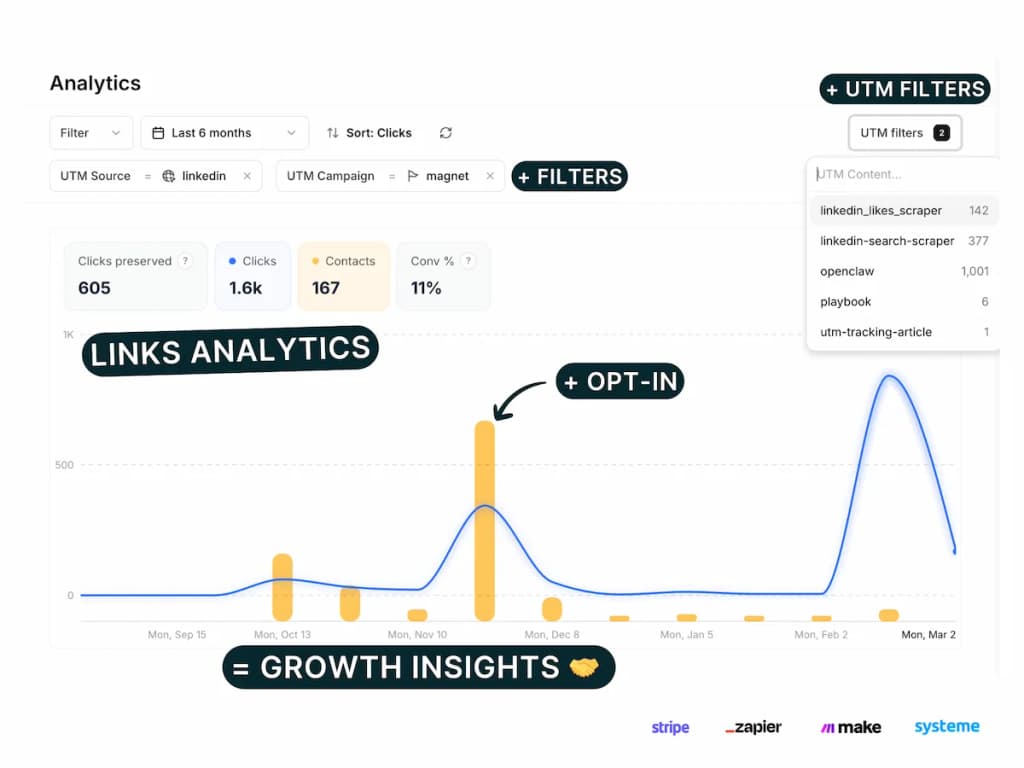
Conversion tracking on every plan — including Free — PIMMS connects clicks to sales via Stripe integration, tracks form submissions, and attributes revenue to specific links and campaigns. TinyURL has zero conversion tracking on any plan. You can shorten a link; you cannot track which click became a sale or a lead.
-
Opt-in form ecosystem — PIMMS has dedicated setup guides for 11+ platforms: Stripe, Tally, Cal.com, Calendly, Brevo, Webflow, Framer, Elementor, Systeme.io, Podia, iClosed — plus 100+ more via Zapier and Make. TinyURL has no opt-in form tracking, no form integration, and no conversion attribution at any price.
-
UTM management — PIMMS offers UTM templates, saved parameter values, filter/sort/group by UTM, and (on Pro+) naming convention enforcement. TinyURL has no UTM builder, no templates, and no campaign parameter management on any plan.
-
Social-media deep linking — PIMMS includes social-media deep linking on every plan, including Free. Links can open directly inside YouTube, TikTok, Instagram, Amazon, Vinted, and 100+ more native apps. TinyURL has no deep linking on any plan.
-
Server-side tracking — PIMMS tracks through server-side events, which means ad blockers do not break your analytics. TinyURL relies on client-side tracking; the free plan has no analytics at all, and Pro analytics can be blocked by ad blockers.
Pricing side by side (verified February 2026)
Prices below come straight from each product's pricing page.
TinyURL plans
Key limitation: TinyURL Free has no analytics whatsoever. You get unlimited shortened URLs on tinyurl.com, but you cannot see how many people clicked, where they came from, or what device they used. Pro adds basic analytics and branded domains, but still no conversion tracking, no sales tracking, no UTM builder, no opt-in forms, and no social-media deep linking.
PIMMS plans
What jumps out immediately:
- TinyURL Free has zero analytics. PIMMS Free gives you 30 days of data, conversion tracking, and event analytics.
- TinyURL has no conversion tracking on any plan. PIMMS includes it on every plan, including Free.
- TinyURL has no UTM builder, no opt-in forms, no social-media deep linking. PIMMS includes all of these on Free.
- PIMMS offers lifetime pricing on Tiny (€79) and Solo (€129). TinyURL is subscription-only.
- TinyURL Pro ($9.99/mo) adds analytics and branded domains but still lacks conversion tracking, UTM management, and social-media deep linking. PIMMS Tiny (€9/mo) includes all of that plus Stripe integration and opt-in form tracking.
Feature comparison: what matters for marketing attribution
Where TinyURL wins
- Brand recognition — TinyURL is the most recognized URL shortener (since 2002). Some audiences trust tinyurl.com links more than unknown domains.
- Free plan volume — Unlimited shortened URLs and unlimited clicks on Free. PIMMS Free limits you to 5 links and 200 events.
- Simplicity — If you only need to shorten a link and do not care about analytics or attribution, TinyURL is fast and free.
- Bulk plans — For high-volume transactional communications (e.g. 100K URLs, 100K clicks/mo), TinyURL has dedicated Bulk tiers. PIMMS caps at 2,000 links/mo on Business.
Where PIMMS wins
- Revenue and conversion tracking — The biggest gap. TinyURL tells you nothing about conversions. PIMMS tells you which click turned into a Stripe payment or a form submission. No TinyURL plan offers conversion or revenue attribution.
- Opt-in form integration ecosystem — Dedicated guides for 11+ platforms; TinyURL has none.
- Professional UTM campaign management — UTM link builder, templates, saved parameters, filter/sort/group, bulk generation, CSV export, and (Pro+) naming conventions and rules. Replaces UTM.io and Google Sheets. TinyURL has no UTM builder at all.
- Social-media deep linking on every plan — Open links directly inside YouTube, TikTok, Instagram, Amazon, Vinted, and 100+ apps. TinyURL has no deep linking.
- Lifetime pricing — Pay once, use forever. Tiny at €79 or Solo at €129. There is no TinyURL equivalent.
- Server-side tracking — PIMMS tracks through server-side events; ad blockers do not break your analytics. TinyURL Free has no analytics; Pro analytics can be blocked.
- Analytics on Free — PIMMS Free gives you 30 days of data and conversion tracking. TinyURL Free gives you zero analytics.
Opt-in form integration ecosystem
PIMMS includes a tracking opt-in form and dedicated setup guides for connecting your forms and booking tools to conversion tracking. TinyURL has no equivalent.
Platforms with dedicated PIMMS guides:
- Stripe — Track payments and revenue from Stripe Checkout and Payment Links
- Tally — Native integration and webhook setup for Tally forms
- Cal.com — Direct webhook and Zapier integration for bookings
- Calendly — Meeting and booking conversion tracking
- Brevo — Forms and meeting conversions
- Webflow — Form submissions and lead capture
- Framer — Form tracking on Framer sites
- Elementor — WordPress/Elementor form leads
- Systeme.io — Sales and lead attribution
- Podia — Stripe payments via Podia
- iClosed — CRM and Zapier integration
Plus 100+ more via Zapier and Make — including Typeform, Google Forms, HubSpot, Notion, Airtable, and most no-code tools.
If you run opt-in forms, demos, or booking flows, PIMMS can attribute each conversion back to the link that drove it. TinyURL cannot.
Professional UTM campaign management
Most link tools offer a basic UTM builder at best. PIMMS treats UTM management as a first-class feature — the kind of capability teams usually pay $19–$159/month for on UTM.io or manage manually in Google Sheets.
What PIMMS includes on all plans (including Free):
- UTM link builder — Visual editor to build UTM-tagged links without manual URL crafting
- UTM templates — Save reusable parameter sets and apply them in one click (3 on Free, unlimited on paid plans)
- Saved UTM parameters — Pre-fill values from saved lists so your team always uses the correct sources, mediums, and campaigns (10 on Free, unlimited on paid plans)
- Filter, sort & group by UTM — Slice your analytics by any UTM parameter: source, medium, campaign, term, content. See which combinations drive the most clicks, conversions, and revenue
- Bulk UTM builder — Paste multiple URLs or import CSV, apply templates, and generate dozens of tracked links in seconds
- CSV export — Export all links and UTM data for reporting or backup
On Pro+ (€39/mo):
- UTM conventions — Require, lock, hide, and validate UTM parameters. Enforce consistent naming taxonomy across your entire team. No more "facebook" vs "Facebook" vs "fb" in your reports
- UTM rules — Define which parameter values are allowed, required, or locked
This replaces both UTM.io ($19–$159/mo) and Google Sheets tracking. If you run more than a handful of campaigns, proper UTM management saves hours and eliminates reporting inconsistencies.
TinyURL has no UTM builder at all — no templates, no saved parameters, no campaign parameter management on any plan.
Real cost comparison for a growing business
Let's compare the cost to get branded links, analytics, and conversion data:
To match PIMMS Free features (conversion tracking, Stripe, social-media deep linking, server-side tracking, UTM builder, opt-in forms, API, 100+ integrations), TinyURL has no equivalent. TinyURL Pro ($9.99/mo) adds analytics and branded domains but still lacks conversion tracking, UTM management, opt-in forms, and social-media deep linking.
With PIMMS Solo, you add A/B testing, webhooks, export, and 5 team members for €129 once (lifetime) or €19/month.
When to choose TinyURL
TinyURL is the right choice if:
- You only need to shorten links — No analytics, no attribution, no campaign tracking. Just a short URL to share.
- Volume is your priority — Unlimited shortened URLs and clicks on Free. PIMMS Free limits you to 5 links and 200 events.
- Brand recognition matters — In some contexts, a tinyurl.com link is more trusted than an unknown domain.
- You need bulk transactional links — High-volume use cases (e.g. 100K+ URLs, 100K clicks/mo) where TinyURL's Bulk plans are designed.
- Simplicity over features — You want the simplest possible tool with no learning curve.
When to choose PIMMS
PIMMS is the right choice if:
- You sell online and want to know which link, campaign, or post drove each Stripe sale or form submission.
- You use opt-in forms, demos, or booking tools — PIMMS has guides for Stripe, Tally, Cal.com, Calendly, Brevo, Webflow, Framer, Elementor, Systeme.io, Podia, iClosed, and 100+ more.
- You share links on social media and want them to open directly in native apps (Instagram, YouTube, LinkedIn) instead of in-app browsers.
- You're budget-conscious — Lifetime deals and a powerful Free plan mean you're not locked into monthly billing.
- You need professional UTM management — Templates, saved parameters, and naming conventions replace spreadsheets.
- You care about tracking accuracy — Server-side tracking means ad blockers do not create blind spots in your data.
- You need analytics on a free plan — PIMMS Free gives you 30 days of data and conversion tracking. TinyURL Free gives you zero.
Quick decision guide
Choose TinyURL if you answer "yes" to any of these:
- I only need to shorten links; I do not care about analytics
- I need unlimited free links and clicks
- I run high-volume bulk link campaigns (100K+ URLs)
- I want the simplest possible tool
- Brand recognition (tinyurl.com) matters to my audience
Choose PIMMS if you answer "yes" to any of these:
- I sell online and need to see which link drove each sale
- I use Tally, Cal.com, Webflow, Stripe, or similar — and want dedicated setup guides
- I share links on social and want them to open in native apps
- I want lifetime pricing (pay once, use forever)
- I need UTM management and campaign attribution
- Ad blockers are affecting my analytics
- I need analytics and conversion tracking on a free plan
Still unsure? Use both free tiers. TinyURL Free gives you unlimited links with zero analytics. PIMMS Free gives you 5 links with conversion tracking, Stripe integration, social-media deep linking, and UTM builder. You can evaluate both in under an hour.
Summary
Both tools shorten URLs. TinyURL excels at volume and simplicity. PIMMS excels at revenue attribution, conversion tracking, UTM management, and an integration ecosystem TinyURL does not offer.
Bottom line: If you care most about shortening links with no analytics and no attribution, TinyURL is the classic choice. If you care about connecting clicks to revenue, tracking opt-in forms, or getting marketing intelligence from your links, PIMMS is the better fit.
FAQ
Does TinyURL have analytics?
TinyURL Free has no analytics at all. You get unlimited shortened URLs and unlimited clicks, but you cannot see how many people clicked, where they came from, or any other data. TinyURL Pro ($9.99/mo) adds an analytics dashboard, but it still has no conversion tracking, no UTM builder, and no opt-in form tracking.
Does TinyURL offer revenue or conversion tracking?
No. TinyURL tracks clicks only on the Pro plan — and even then, it does not connect clicks to sales or conversions. There is no Stripe integration, no opt-in form tracking, and no revenue attribution on any TinyURL plan. PIMMS includes conversion tracking and Stripe integration on the free plan.
Is PIMMS really free to start?
Yes. The PIMMS Free plan includes 5 smart links, 200 tracked events per month, 30 days of data retention, conversion tracking, Stripe integration, server-side tracking, social-media deep linking, UTM builder, opt-in form tracking, API access (60 req/min), and 100+ integrations (Zapier, Make). No credit card required.
Can I use a custom domain with PIMMS?
Yes. Custom branded domains are available from the Tiny plan (€9/mo or €79 lifetime). You can connect your own domain so links look like yoursite.co/link instead of a generic short URL. TinyURL Pro offers up to 3 branded domains for $9.99/mo.
What's the lifetime pricing?
PIMMS Tiny is €79 one-time (100 links/mo, 1 custom domain, 1 year data). PIMMS Solo is €129 one-time (500 links/mo, 3 domains, A/B testing, webhooks, export, 5 team members). You pay once and use the plan forever. TinyURL does not offer lifetime pricing.
Does TinyURL have a UTM builder?
No. TinyURL has no UTM builder, no UTM templates, and no campaign parameter management on any plan. PIMMS includes UTM templates, saved parameters, and filter/sort/group by UTM on every plan, including Free.
What opt-in form platforms does PIMMS support?
PIMMS has dedicated setup guides for Stripe, Tally, Cal.com, Calendly, Brevo, Webflow, Framer, Elementor, Systeme.io, Podia, iClosed — plus 100+ more via Zapier and Make. TinyURL has no conversion or form tracking on any plan.
Why is TinyURL so limited on analytics?
TinyURL was built in 2002 as a simple link shortener. Its free plan has always been focused on volume (unlimited links, unlimited clicks) rather than analytics. The Pro plan adds basic analytics, but the product has not evolved toward conversion tracking, UTM management, or marketing attribution. PIMMS was built from the ground up for revenue attribution and conversion tracking.