Sniply and PIMMS (open-source: GitHub) are often mentioned in the same breath as "link tools" — but they solve fundamentally different problems. Sniply adds call-to-action overlays to any link you share, so readers see your custom CTA bar when they land on third-party content. PIMMS tracks revenue from click to sale, connecting every link to Stripe payments, form submissions, and meeting bookings.
If you're trying to decide between them, the first question is: what are you trying to achieve? Engagement on curated content, or revenue attribution? This comparison explains when each tool makes sense — and when you might use both together.
What is Sniply?
Sniply is a CTA overlay tool. When you share a link (for example, to a Forbes article or a competitor's blog post), Sniply wraps it so that visitors see a custom call-to-action bar or button overlaid on the destination page. The idea: you curate great content, add your own CTA, and drive traffic to your site, newsletter, or product.
Core strength: Content marketers who share third-party articles and want to add a branded CTA without building their own content. Sniply measures CTA impressions — how many people saw your overlay — not conversions or revenue.
Sniply was acquired by UpContent. It has no free plan (14-day free trial only). Pricing starts at $9/mo (Basic) and goes to $59/mo (Business) or custom (Enterprise). Annual plans include 2 months free.
What Sniply does not do: No conversion tracking. No sales tracking. No Stripe integration. No deep linking. No UTM management. No server-side tracking. No opt-in form tracking. It is not a link shortener or attribution platform — it is a CTA overlay layer on top of existing links.
What is PIMMS?
PIMMS is a link management and revenue attribution platform. It shortens links, builds UTMs, tracks clicks, and — crucially — connects those clicks to actual conversions: Stripe payments, Tally forms, Cal.com bookings, Webflow leads, and 100+ other platforms via Zapier and Make.
Core strength: Founders, freelancers, and growth marketers who need to know which link, campaign, or post drove each sale or lead. PIMMS measures revenue, not impressions.
PIMMS has a free plan (5 links, 200 events, 30 days) that includes conversion tracking, Stripe integration, opt-in form tracking, server-side tracking, social-media deep linking, UTM builder, and 100+ integrations. Paid plans start at €9/mo (Tiny) with lifetime options (€79 for Tiny, €129 for Solo).
Different tools, different goals
Bottom line: Sniply is great for content marketers who share curated articles and want to add a CTA. PIMMS is for teams that need revenue attribution. They can work together: use Sniply to add CTAs to shared links, and PIMMS to track which of those links (or your own links) drive conversions.
Pricing side by side (verified February 2026)
Sniply plans
Sniply has no free plan. API access and setup assistance are available on Enterprise.
PIMMS plans
What stands out:
- Sniply has no free plan — 14-day trial only. PIMMS Free includes conversion tracking, Stripe, opt-in forms, social-media deep linking, and server-side tracking.
- Sniply measures impressions — CTA views. PIMMS measures conversions and revenue.
- Different pricing models — Sniply tiers by CTA impressions; PIMMS tiers by links and events.
- PIMMS offers lifetime pricing — €79 (Tiny) and €129 (Solo). Sniply is subscription-only.
Feature comparison
Where Sniply wins
- CTA overlays on third-party content — If you share curated articles, competitor posts, or industry news and want to add your own call-to-action without owning the content, Sniply is built for that. PIMMS does not offer this.
- Content curation workflow — Sniply fits a workflow where you discover, curate, and share content with a branded CTA. PIMMS fits a workflow where you create links, run campaigns, and attribute revenue.
- Simplicity for one job — Sniply does one thing well: overlay CTAs. If that's your only need, it's straightforward.
Where PIMMS wins
- Conversion tracking on Free — PIMMS includes conversion tracking, Stripe integration, and opt-in form tracking on the free plan. Sniply has no conversion tracking at any price.
- Revenue, not impressions — PIMMS tells you which link drove a sale or a lead. Sniply tells you how many people saw your CTA. Different metrics for different goals.
- Opt-in form ecosystem — PIMMS has dedicated setup guides for Stripe, Tally, Cal.com, Calendly, Brevo, Webflow, Framer, Elementor, Systeme.io, Podia, iClosed — plus 100+ more via Zapier and Make. Sniply has no equivalent.
- Professional UTM campaign management — UTM link builder, templates, saved parameters, filter/sort/group, bulk generation, CSV export, and (Pro+) naming conventions and rules. Replaces UTM.io and Google Sheets. Sniply has no UTM management.
- Social-media deep linking — Open links directly inside YouTube, TikTok, Instagram, and 100+ apps. Sniply does not offer this.
- Server-side tracking — PIMMS tracks through server-side events; ad blockers do not break your analytics. Sniply relies on client-side tracking.
- Free plan — PIMMS Free gives you conversion tracking, Stripe, opt-in forms, social-media deep linking, and more. Sniply requires a paid plan after the 14-day trial.
Opt-in form integration ecosystem
PIMMS includes a tracking opt-in form and dedicated setup guides for connecting your forms and booking tools to conversion tracking. Sniply has no equivalent — it is not designed for form or payment attribution.
Platforms with dedicated PIMMS guides:
- Stripe — Track payments and revenue from Stripe Checkout and Payment Links
- Tally — Native integration and webhook setup for Tally forms
- Cal.com — Direct webhook and Zapier integration for bookings
- Calendly — Meeting and booking conversion tracking
- Brevo — Forms and meeting conversions
- Webflow — Form submissions and lead capture
- Framer — Form tracking on Framer sites
- Elementor — WordPress/Elementor form leads
- Systeme.io — Sales and lead attribution
- Podia — Stripe payments via Podia
- iClosed — CRM and Zapier integration
Plus 100+ more via Zapier and Make — including Typeform, Google Forms, HubSpot, Notion, Airtable, and most no-code tools.
If you run opt-in forms, demos, or booking flows, PIMMS can attribute each conversion back to the link that drove it. Sniply cannot — it measures CTA impressions, not conversions.
Professional UTM campaign management
Most link tools offer a basic UTM builder at best. PIMMS treats UTM management as a first-class feature — the kind of capability teams usually pay $19–$159/month for on UTM.io or manage manually in Google Sheets.
What PIMMS includes on all plans (including Free):
- UTM link builder — Visual editor to build UTM-tagged links without manual URL crafting
- UTM templates — Save reusable parameter sets and apply them in one click (3 on Free, unlimited on paid plans)
- Saved UTM parameters — Pre-fill values from saved lists so your team always uses the correct sources, mediums, and campaigns (10 on Free, unlimited on paid plans)
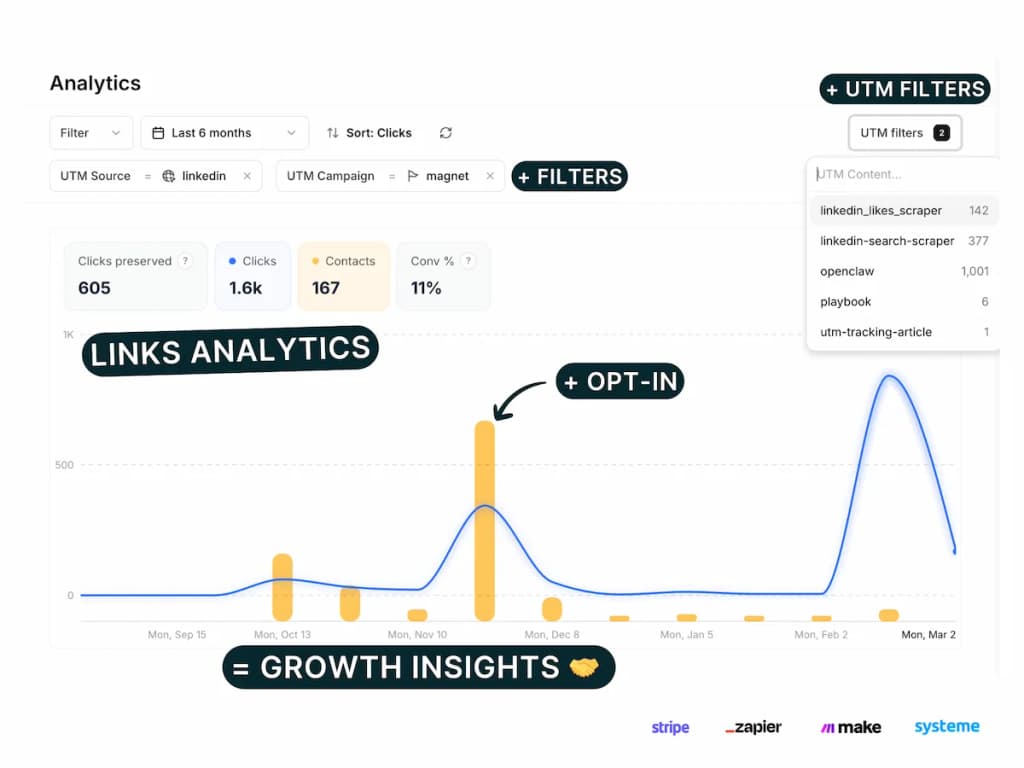
- Filter, sort & group by UTM — Slice your analytics by any UTM parameter: source, medium, campaign, term, content. See which combinations drive the most clicks, conversions, and revenue
- Bulk UTM builder — Paste multiple URLs or import CSV, apply templates, and generate dozens of tracked links in seconds
- CSV export — Export all links and UTM data for reporting or backup
On Pro+ (€39/mo):
- UTM conventions — Require, lock, hide, and validate UTM parameters. Enforce consistent naming taxonomy across your entire team. No more "facebook" vs "Facebook" vs "fb" in your reports
- UTM rules — Define which parameter values are allowed, required, or locked
This replaces both UTM.io ($19–$159/mo) and Google Sheets tracking. If you run more than a handful of campaigns, proper UTM management saves hours and eliminates reporting inconsistencies.
Sniply has no UTM management — it is a CTA overlay tool, not a link or campaign management platform.
Can you use Sniply and PIMMS together?
Yes. They solve different problems and can complement each other:
- Sniply for curated content — Share third-party articles with a CTA overlay. Sniply handles the overlay; you get CTA impression data.
- PIMMS for your own links — Use PIMMS for links to your landing pages, Stripe Checkout, Cal.com, Tally, etc. PIMMS tracks which link drove each sale or lead.
- Hybrid workflow — If you share both curated content (via Sniply) and your own links (via PIMMS), you get CTA engagement on curated content and revenue attribution on your own campaigns.
The tradeoff: two tools, two dashboards. If your primary goal is revenue attribution, PIMMS alone may be enough. If your primary goal is CTA overlays on curated content, Sniply is the right tool — and you might add PIMMS for revenue tracking on your own links.
When to choose Sniply
Sniply is the right choice if:
- You share third-party content — Articles, blog posts, industry news — and want to add your own CTA without owning the content.
- CTA impressions matter more than conversions — You care about how many people see your overlay; you're not yet focused on attributing revenue to specific links.
- Content curation is core to your strategy — You build authority by curating and commenting on others' content. Sniply fits that workflow.
- You're okay with a paid plan — Sniply has no free tier; you'll pay after the 14-day trial.
When to choose PIMMS
PIMMS is the right choice if:
- You sell online and want to know which link, campaign, or post drove each Stripe sale or form submission.
- You use opt-in forms, demos, or booking tools — PIMMS has guides for Stripe, Tally, Cal.com, Calendly, Brevo, Webflow, Framer, Elementor, Systeme.io, Podia, iClosed, and 100+ more.
- You share links on social media and want them to open directly in native apps (Instagram, YouTube, LinkedIn) instead of in-app browsers.
- You need professional UTM management — Templates, saved parameters, and naming conventions replace spreadsheets.
- You're budget-conscious — PIMMS Free includes conversion tracking, Stripe, opt-in forms, social-media deep linking, and server-side tracking. Lifetime deals (€79, €129) are available.
- You care about tracking accuracy — Server-side tracking means ad blockers do not create blind spots in your data.
Summary
Sniply and PIMMS are different tools for different goals. Sniply excels at adding CTAs to curated content. PIMMS excels at connecting clicks to revenue. Use Sniply when CTA overlays matter; use PIMMS when revenue attribution matters. Or use both if your strategy includes curated content and your own conversion-focused links.
FAQ
Is Sniply a link shortener?
No. Sniply is a CTA overlay tool. It wraps links so that when visitors land on the destination page (e.g., a third-party article), they see a custom call-to-action bar or button. It does not shorten links or provide UTM management. PIMMS is a link shortener and attribution platform.
Does Sniply track conversions or revenue?
No. Sniply measures CTA impressions — how many people saw your overlay. It does not track conversions, sales, or revenue. There is no Stripe integration, no opt-in form tracking, and no conversion attribution. PIMMS tracks conversions and revenue on every plan, including Free.
Does PIMMS offer CTA overlays on third-party content?
No. PIMMS is built for link shortening, UTM management, conversion tracking, and revenue attribution. It does not add CTA overlays to shared links. Sniply is the tool for that use case.
Can I use Sniply and PIMMS together?
Yes. Use Sniply for curated content where you want CTA overlays. Use PIMMS for your own links where you need conversion and revenue tracking. They solve different problems and can complement each other.
Does Sniply have a free plan?
No. Sniply offers a 14-day free trial. After that, you need a paid plan (Basic $9/mo, Pro $29/mo, Business $59/mo). PIMMS has a free plan that includes conversion tracking, Stripe integration, opt-in form tracking, social-media deep linking, and server-side tracking.
What does Sniply measure?
Sniply measures CTA impressions — the number of times your call-to-action overlay was displayed to visitors. It does not measure clicks on your CTA, conversions, or revenue. PIMMS measures clicks, conversions, and revenue (via Stripe and opt-in form integrations).
Is Sniply good for content marketers?
Yes. Sniply is well-suited for content marketers who share third-party articles, industry news, or curated content and want to add a branded call-to-action. It lets you add your CTA to any link without owning the destination content. PIMMS is better suited for teams that need to attribute revenue to specific links and campaigns.
What's the main difference between Sniply and PIMMS?
Sniply adds CTA overlays to shared links and measures impressions. PIMMS shortens links, manages UTMs, tracks conversions, and connects clicks to revenue (Stripe, forms, bookings). Sniply is for engagement on curated content; PIMMS is for revenue attribution. Different tools, different goals.