Pretty Links is a popular WordPress plugin for affiliate marketers who need clean redirect URLs and auto-linking keywords. It does one thing well: manage redirects inside WordPress.
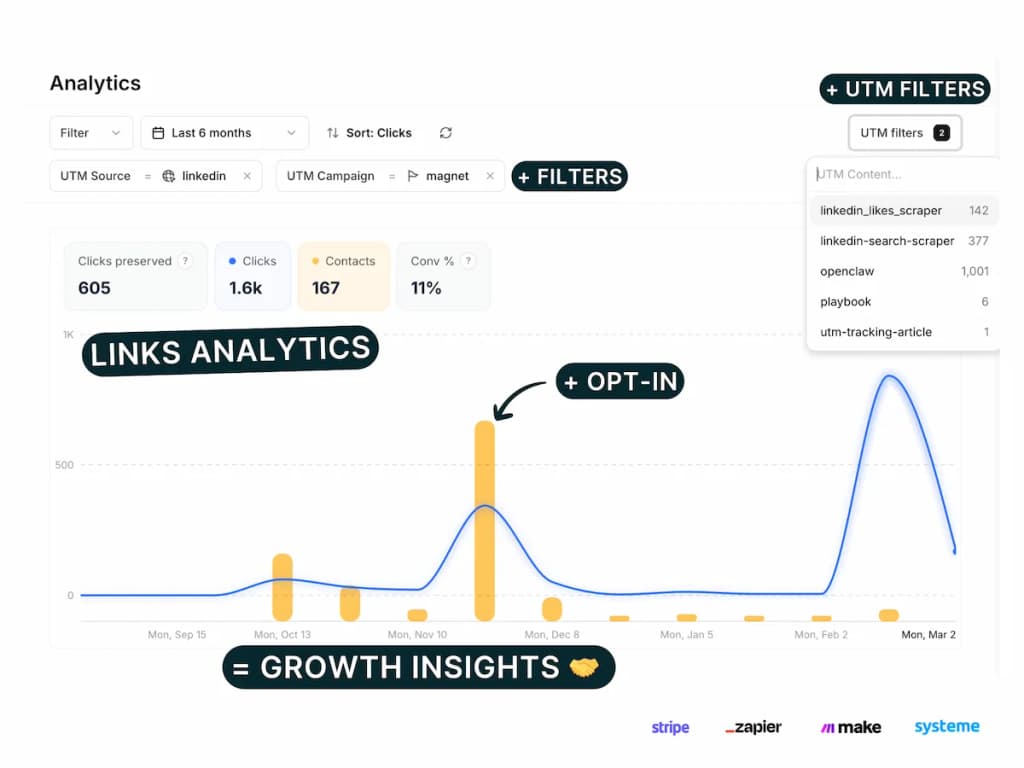
PIMMS (open-source: GitHub) is a platform-agnostic SaaS that connects links to revenue — Stripe sales, form submissions, meeting bookings — across any website, no-code tool, or platform.
This comparison uses verified pricing from February 2026. The core difference: Pretty Links is WordPress-only. PIMMS works everywhere. If you're trying to tie clicks to actual revenue outside WordPress, or you use Framer, Webflow, Stripe Checkout, or Cal.com, Pretty Links cannot help. Here's the full picture.
What is Pretty Links?
Pretty Links is a WordPress plugin that lets you create short, clean redirect URLs (e.g. yoursite.com/go/product) and automatically link keywords across your posts and pages. It's designed for affiliate marketers who run their sites on WordPress.
Core strengths: Auto-create links from affiliate URLs, auto-link keywords to your pretty URLs, advanced redirect types (301, 302, 307, meta refresh), import/export links, split-test links (Marketer+), and conversion reports (Marketer+). It's straightforward, stays inside WordPress, and requires no external SaaS.
Core limitations: It only works within WordPress. There is no free plan. No native Stripe or Shopify integration. No server-side tracking. No deep linking. No opt-in form tracking. No UTM management. "Conversion reports" on Marketer+ are basic — not the same as revenue attribution tied to Stripe or form submissions.
Pretty Links is excellent for WordPress users who need redirect management and auto-keyword-linking. If that's your use case, it does the job well.
What is PIMMS?
PIMMS is a link management and revenue attribution platform that works across any website, no-code tool, or platform. It connects clicks to sales (via Stripe), form submissions, and meeting bookings — with dedicated setup guides for 11+ platforms and 100+ more via Zapier and Make.
Core strengths: Conversion tracking, Stripe integration, opt-in form tracking, and server-side tracking on every plan — including Free. Social-media deep linking on all plans. Professional UTM management (templates, saved parameters, filter/sort/group). Works with WordPress, Webflow, Framer, Stripe, Tally, Cal.com, Calendly, and more.
Three things PIMMS does that Pretty Links cannot
Before diving into pricing and feature tables:
-
Works everywhere — PIMMS is platform-agnostic. Use it with WordPress, Webflow, Framer, Stripe Checkout, Cal.com, Tally, or any site. Pretty Links only works inside WordPress. If your funnel spans multiple tools or you don't use WordPress, Pretty Links is not an option.
-
Conversion tracking and revenue attribution on Free — PIMMS includes conversion tracking, unlimited sales tracking, Stripe integration, and opt-in form tracking on the free plan. Pretty Links has no free plan. "Conversion reports" on Marketer+ ($149.60/yr) are basic — not native Stripe or form tracking. You cannot connect a Stripe payment or a Cal.com booking to a specific link with Pretty Links.
-
Opt-in form ecosystem and server-side tracking — PIMMS has dedicated guides for Stripe, Tally, Cal.com, Calendly, Brevo, Webflow, Framer, Elementor, Systeme.io, Podia, iClosed — plus 100+ via Zapier/Make. Pretty Links has no opt-in form tracking. PIMMS also uses server-side tracking, which bypasses ad blockers. Pretty Links does not.
Pricing side by side (verified February 2026)
Pretty Links plans (WordPress plugin)
Key features by plan:
-
Beginner: Import/export links, auto-create links, advanced redirect types
-
Marketer: Priority support, conversion reports, split-test links, auto-link keywords, link in bio add-on
-
Super Affiliate: QR code generation, developer tools, product displays
-
No free plan
-
14-day money-back guarantee
-
Current prices are introductory — renewals at full price
-
All plans are WordPress-only
PIMMS plans
What stands out:
- Pretty Links has no free plan. PIMMS Free includes conversion tracking, Stripe integration, opt-in form tracking, social-media deep linking, and server-side tracking.
- Pretty Links is WordPress-only. PIMMS works with any website or platform.
- PIMMS offers lifetime pricing on Tiny (€79) and Solo (€129). Pretty Links is subscription-only.
- Pretty Links excels at auto-keyword-linking — a feature PIMMS does not offer. If that's your primary need and you're on WordPress, Pretty Links has a clear edge there.
Feature comparison
Where Pretty Links wins
- Auto-link keywords — Automatically turn affiliate URLs into pretty links and link keywords across your WordPress content. PIMMS does not offer this. If you're an affiliate marketer with lots of product mentions, Pretty Links saves time.
- WordPress-native — No external dashboard. Everything lives inside your WordPress admin. Simple for WP-only workflows.
- Split-test links — Built-in A/B testing for links on Marketer+ and above. PIMMS has A/B testing from Solo+.
- Link in bio add-on — Available on Marketer+. PIMMS does not have a dedicated link-in-bio product.
Where PIMMS wins
- Platform-agnostic — Works with WordPress, Webflow, Framer, Stripe, Tally, Cal.com, and any site. Pretty Links is WordPress-only.
- Conversion tracking on Free — Connect clicks to Stripe sales and form submissions from day one. Pretty Links has no free plan and only basic conversion reports on Marketer+.
- Opt-in form ecosystem — Dedicated guides for Stripe, Tally, Cal.com, Calendly, Brevo, Webflow, Framer, Elementor, Systeme.io, Podia, iClosed — plus 100+ via Zapier/Make. Pretty Links has no opt-in form tracking.
- Server-side tracking — Bypasses ad blockers. Pretty Links does not offer this.
- Social-media deep linking — Open links directly inside YouTube, TikTok, Instagram, and 100+ apps. Pretty Links does not support deep linking.
- Professional UTM campaign management — Visual UTM link builder, templates (3 on Free, unlimited on paid), saved parameters (10 on Free), bulk UTM builder, filter/sort/group by UTM, CSV export, and (on Pro+) UTM conventions to enforce naming taxonomy. Replaces UTM.io ($19–$159/mo) and Google Sheets. Pretty Links has a basic UTM builder only — no templates, saved parameters, or conventions.
- Lifetime pricing — PIMMS Tiny (€79) and Solo (€129) can be purchased once. Pretty Links is subscription-only.
Opt-in form integration ecosystem
PIMMS includes a tracking opt-in form and dedicated setup guides for connecting your forms and booking tools to conversion tracking. Pretty Links has no equivalent.
Platforms with dedicated PIMMS guides:
- Stripe — Track payments and revenue from Stripe Checkout and Payment Links
- Tally — Native integration and webhook setup for Tally forms
- Cal.com — Direct webhook and Zapier integration for bookings
- Calendly — Meeting and booking conversion tracking
- Brevo — Forms and meeting conversions
- Webflow — Form submissions and lead capture
- Framer — Form tracking on Framer sites
- Elementor — WordPress/Elementor form leads
- Systeme.io — Sales and lead attribution
- Podia — Stripe payments via Podia
- iClosed — CRM and Zapier integration
Plus 100+ more via Zapier and Make — including Typeform, Google Forms, HubSpot, Notion, Airtable, and most no-code tools.
If you run opt-in forms, demos, or booking flows outside WordPress, PIMMS can attribute each conversion back to the link that drove it. Pretty Links cannot — it only works inside WordPress and has no form tracking.
Professional UTM campaign management
Most link tools offer a basic UTM builder at best. PIMMS treats UTM management as a first-class feature — the kind of capability teams usually pay $19–$159/month for on UTM.io or manage manually in Google Sheets.
What PIMMS includes on all plans (including Free):
- UTM link builder — Visual editor to build UTM-tagged links without manual URL crafting
- UTM templates — Save reusable parameter sets and apply them in one click (3 on Free, unlimited on paid plans)
- Saved UTM parameters — Pre-fill values from saved lists so your team always uses the correct sources, mediums, and campaigns (10 on Free, unlimited on paid plans)
- Filter, sort & group by UTM — Slice your analytics by any UTM parameter: source, medium, campaign, term, content. See which combinations drive the most clicks, conversions, and revenue
- Bulk UTM builder — Paste multiple URLs or import CSV, apply templates, and generate dozens of tracked links in seconds
- CSV export — Export all links and UTM data for reporting or backup
On Pro+ (€39/mo):
- UTM conventions — Require, lock, hide, and validate UTM parameters. Enforce consistent naming taxonomy across your entire team
- UTM rules — Define which parameter values are allowed, required, or locked
This replaces both UTM.io ($19–$159/mo) and Google Sheets tracking.
Pretty Links has a basic UTM builder — no templates, saved parameters, filter/sort/group, or conventions.
When to choose Pretty Links
Pretty Links is the right choice if:
- You run a WordPress site and need redirect management and auto-keyword-linking for affiliate links.
- Your entire funnel lives in WordPress — You don't use Webflow, Framer, Stripe Checkout, Cal.com, or similar tools.
- Auto-link keywords is your main need — You want to automatically turn product names into pretty affiliate URLs across your content. PIMMS does not offer this.
- You're okay with subscription-only pricing — No free plan, no lifetime option.
- You don't need revenue attribution — Basic conversion reports on Marketer+ are enough; you're not connecting links to Stripe sales or form submissions.
When to choose PIMMS
PIMMS is the right choice if:
- You sell online and want to know which link drove each Stripe sale or form submission — on any platform.
- Your funnel spans multiple tools — Webflow, Framer, Stripe, Tally, Cal.com, Calendly, or similar. Pretty Links only works in WordPress.
- You use opt-in forms, demos, or booking tools — PIMMS has guides for 11+ platforms and 100+ via Zapier/Make. Pretty Links has no form tracking.
- You share links on social media and want them to open directly inside YouTube, TikTok, Instagram — social-media deep linking is included on every PIMMS plan.
- You need professional UTM management — Templates, saved parameters, filter/sort/group, naming conventions. Pretty Links has none.
- You want a free tier — PIMMS Free includes conversion tracking, Stripe integration, opt-in form tracking, social-media deep linking, and server-side tracking. Pretty Links has no free plan.
- Ad blockers are a concern — PIMMS uses server-side tracking. Pretty Links does not.
Summary
Bottom line: Pretty Links is excellent for WordPress users who need redirect management and auto-keyword-linking. If that's your use case and your entire funnel is in WordPress, it's a solid choice. If you need to track revenue across Webflow, Framer, Stripe, Cal.com, or any non-WordPress tool, PIMMS is the only option of the two — and conversion tracking is free.
FAQ
Is Pretty Links free?
No. Pretty Links has no free plan. The entry tier is Beginner at $99.60/yr (introductory price, normally $249/yr). PIMMS has a free plan that includes conversion tracking, Stripe integration, opt-in form tracking, social-media deep linking, and server-side tracking.
Does Pretty Links work outside WordPress?
No. Pretty Links is a WordPress plugin and only works within WordPress. PIMMS is platform-agnostic and works with any website, no-code tool, or platform — including WordPress, Webflow, Framer, Stripe, Tally, Cal.com, and more.
Can Pretty Links track Stripe sales or form submissions?
No. Pretty Links has "conversion reports" on the Marketer plan ($149.60/yr) but no native Stripe integration or opt-in form tracking. You cannot connect a Stripe payment or a Cal.com booking to a specific link. PIMMS includes conversion tracking, Stripe integration, and opt-in form tracking on the free plan.
What is Pretty Links best for?
Pretty Links is best for affiliate marketers using WordPress who need clean redirect URLs and auto-keyword-linking — automatically turning product names into pretty affiliate links across their content. It excels at that. It does not offer revenue attribution, social-media deep linking, server-side tracking, or UTM management.
Does PIMMS have auto-link keywords like Pretty Links?
No. PIMMS does not offer auto-link keywords. If that feature is essential and you're on WordPress, Pretty Links has the edge. PIMMS focuses on conversion tracking, UTM management, social-media deep linking, and opt-in form attribution across all platforms.
Can I use both Pretty Links and PIMMS?
Yes. You could use Pretty Links for WordPress redirects and auto-keyword-linking, and PIMMS for campaigns where you need revenue attribution, opt-in form tracking, or links used outside WordPress (e.g. in Cal.com, Stripe, Webflow). The tradeoff is managing two tools and two sets of links.