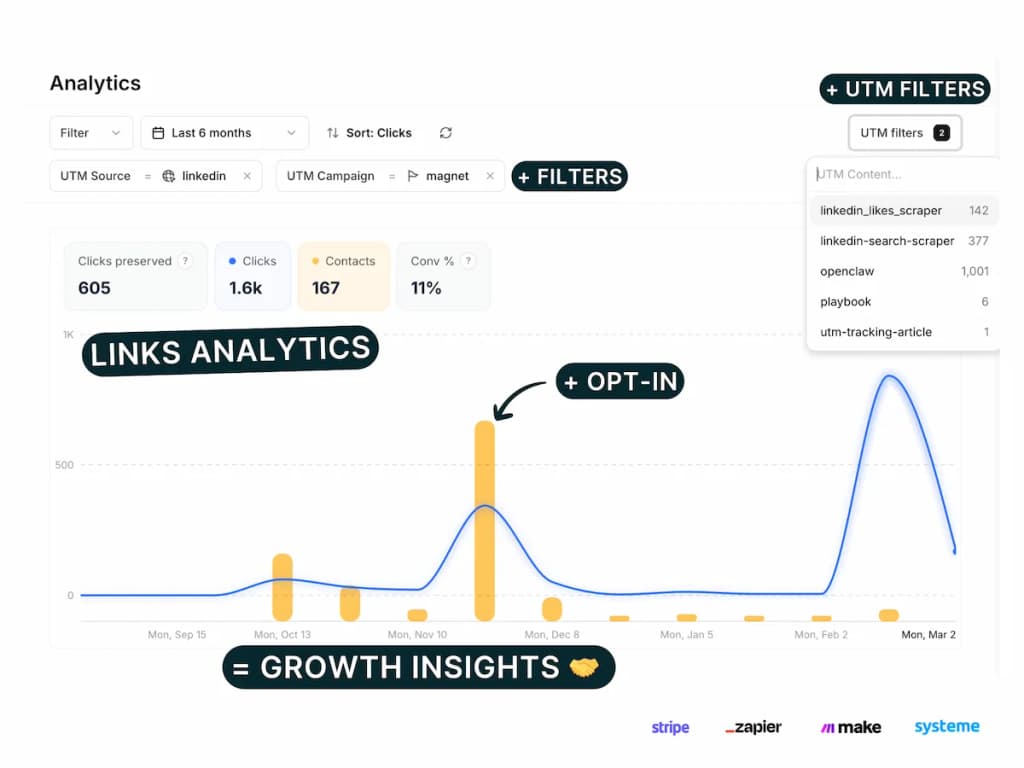
Stripe payment tracking lets you see exactly which marketing campaigns generate sales from your online store. The Pimms dashboard has an interactive setup wizard that handles all the technical details — no coding required.
You'll get real-time sales attribution showing which ads, email campaigns, or YouTube posts drive purchases through your Stripe checkout. Perfect for e-commerce analytics with complete revenue tracking from click to sale.
Whether you sell digital products, SaaS subscriptions, or physical goods, connecting Stripe to Pimms gives you a clear picture of your marketing ROI by tying every dollar of revenue back to the campaign that generated it.
Why track Stripe payments with Pimms?
-
Know which ads actually make money. You spend $500 on Facebook ads and $300 on LinkedIn. Both get clicks, but Pimms shows you that LinkedIn generated 8 sales ($2,400 revenue) while Facebook only brought 2 ($180). Now you know where to double down.
-
Stop guessing about content ROI. You published a YouTube video and shared it on Twitter. A week later, you see 15 new Stripe sales. Without Pimms, you'd never know which channel drove them. With Pimms, every sale is linked to the exact post or video that brought the customer.
-
Track affiliate and partner performance. Give each affiliate or partner a unique Pimms link to your Stripe checkout. You'll see exactly who drives revenue and how much — no spreadsheets or honor system needed.
Prerequisites
- A Stripe account (free or paid — any plan works)
- A Pimms account (sign up here)
- At least one Stripe Payment Link or Checkout page ready
What you'll track
- Stripe payments — Every completed payment through Payment Links and Stripe Checkout, including product name, amount, and customer email
- Sales attribution by campaign — Which specific ad, email, social post, or partner link drove each sale
- Revenue per campaign — Total revenue broken down by traffic source so you can calculate true ROI
- Customer journey — The full path from first click to completed purchase
How to set it up
Go to your Pimms dashboard, open Integrations → Stripe, and launch the setup wizard. It guides you step by step through the full connection — connect your Stripe account via OAuth, approve permissions, and verify with a test purchase. The whole process takes under 5 minutes.
What the setup wizard covers
The Stripe wizard has 5 steps:
- Connect your Stripe account — OAuth, live and test mode
- Approve permissions — In the Stripe Dashboard
- Create a test link — With a Stripe Payment Link URL (expires in 24h)
- Make a test purchase — Waits for sale detection
- Setup on a website — Optional, for embedding Stripe on your site
How it works
- Create a Pimms link pointing to your Stripe Payment Link or checkout page (e.g.
pim.ms/my-product) - Share that link in your campaigns — ads, emails, social posts, YouTube descriptions
- A visitor clicks, lands on your Stripe page, and completes a purchase
- Pimms attributes the sale to the exact campaign, ad, or post that brought the buyer — visible instantly in your dashboard
No scripts or code to install. Stripe's OAuth integration handles everything server-side.
Best ways to share your tracking links
- LinkedIn posts — Share your product link with a Pimms URL to track which posts drive purchases
- Email campaigns — Replace raw Stripe links with Pimms links in your newsletters and drip sequences
- YouTube descriptions — Add a tracked link below your product demos and tutorials
- Paid ads — Use Pimms links as your ad destination to see exactly which ad creative converts
- Twitter/X and Instagram bio — Track social traffic that converts into paying customers
What you'll see in your dashboard
Once connected, your Pimms dashboard shows a real-time feed of every Stripe sale with full attribution. For each sale, you'll see the product name, amount, customer email, and the complete campaign trail — which link they clicked, from which platform, and when. You can filter by date range, campaign, or traffic source to compare performance across channels.
FAQs
Do I need coding skills to set up Stripe payment tracking?
No! This Stripe payment tracking setup requires zero coding. You'll just connect your Stripe account to Pimms through the dashboard, create tracking links, and start seeing sales attribution data immediately. Perfect for non-technical store owners.
Can I track both one-time and subscription payments?
Yes! Stripe payment tracking works for all payment types including one-time purchases, subscriptions, and recurring billing. You'll see the initial conversion when customers subscribe, plus ongoing revenue attribution for all future payments.
What if I sell multiple products at different price points?
All your Stripe products are tracked automatically once connected. Each sale shows the specific product purchased, amount, customer details, and complete attribution data showing exactly which campaign generated the revenue.
Does Stripe tracking work in test mode?
Yes. The setup wizard lets you connect Stripe in both live and test mode. Use test mode to verify everything works before going live — you can make test purchases with Stripe's test card numbers without spending real money.
It starts here
If you made it this far, it's time to grab 10 free links.
10 smart links included • No credit card