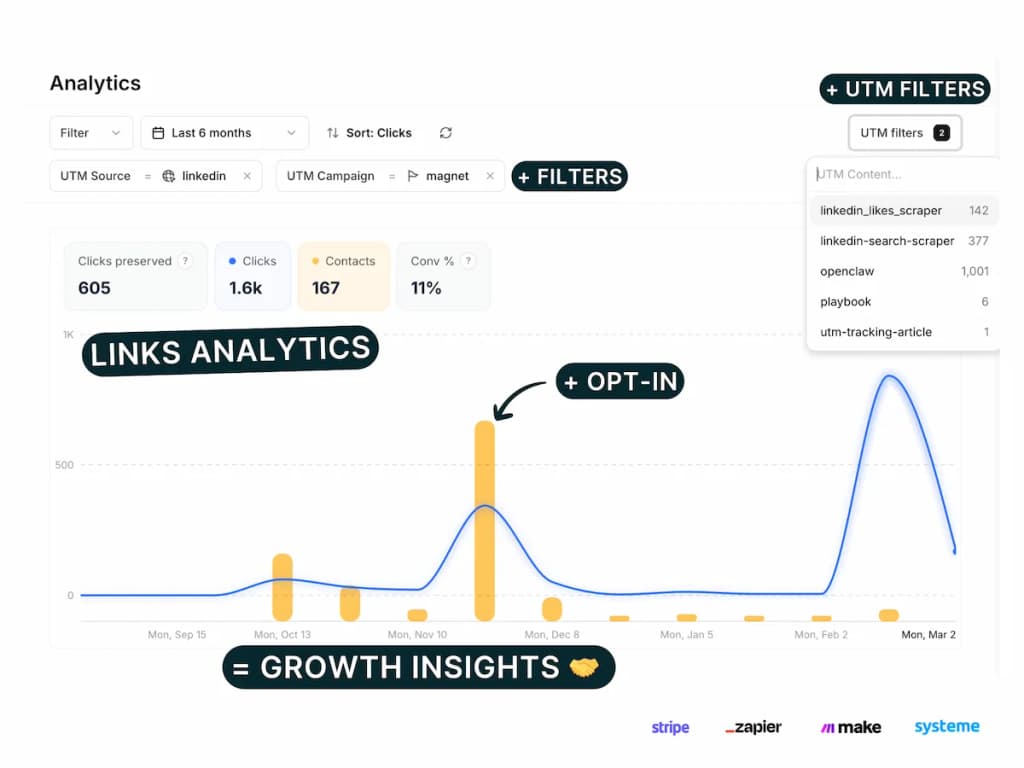
Track every Tally.so form submission with full attribution — which link or campaign drove each lead — using Tally webhooks + Pimms. The Pimms dashboard includes an interactive Tally setup wizard that handles all technical details for you.
Tally.so is one of the simplest and most popular form builders, offering webhooks even on the free plan. Combined with Pimms, you get instant, real-time lead attribution with no third-party middleware or paid tools required.
Whether you use Tally for lead capture, surveys, or contact forms, Pimms tracks every submission and connects it to the exact campaign that brought the visitor.
Why track Tally forms with Pimms?
-
Know which campaigns actually generate leads. You embed a Tally form on your landing page and share it across LinkedIn, email, and Twitter. Without Pimms, you see form submissions in Tally but can't tell which channel drove them. With Pimms, every submission shows exactly where the lead came from.
-
Measure content-driven lead generation. You write blog posts with embedded Tally forms for newsletter signups or waitlists. Pimms connects each form submission to the specific article that brought the reader, showing you which content actually converts.
-
Compare ad platforms side by side. Running Google Ads and Facebook Ads, both pointing to a page with a Tally form? Create separate Pimms links for each and see which platform generates more form fills — not just more clicks.
Prerequisites
- A Tally.so account (free or paid — webhooks work on all plans)
- A Pimms account (sign up here)
- A website or landing page where your Tally form is embedded
What you'll track
- Tally form submissions — Every form fill with the respondent's data and the campaign that brought them
- Lead attribution by campaign — Which ad, email, social post, or content piece drove each submission
- Campaign performance — Conversion rates and submission counts broken down by traffic source
- Multi-form analytics — Track all your Tally forms from one dashboard
How to set it up
Go to your Pimms dashboard, open Integrations → Tally, and launch the setup wizard. It walks you through installing the detection script, adding a hidden tracking field to your Tally form, configuring the webhook, and verifying with a test submission. Setup takes about 5 minutes.
What the setup wizard covers
The Tally wizard has 6 steps:
- Install the detection script — Add the Pimms script to the page where your Tally form is embedded
- Verify script installation — Confirm the script is loading and detecting the Tally domain
- Add pimms_id hidden field — Add a hidden field to your Tally form that captures the tracking ID
- Set up webhook in Tally — Configure Tally's webhook to send submissions to Pimms
- Create a test link — Generate a tracking link to the page with your Tally form
- Verify tracking works — Submit a test form to confirm attribution is connected
How it works
- Install the Pimms detection script on the page where your Tally form is embedded — it detects visitors from Pimms links and sets up outbound tracking for the tally.so domain
- When a visitor arrives via a Pimms link, the script automatically passes the click ID to the Tally form through a hidden field
- The visitor fills out the form — the submission includes the Pimms tracking ID
- Tally fires a webhook to Pimms with the form data and tracking ID, and Pimms attributes the lead to the original campaign
The webhook fires instantly when a form is submitted, so attribution data appears in your dashboard within seconds.
Best ways to share your tracking links
- Landing pages — Drive traffic to your Tally-embedded landing page with Pimms links to track conversion rates per campaign
- LinkedIn posts — Share your signup or waitlist form via a Pimms link to see which posts generate the most signups
- Email campaigns — Use Pimms links in newsletters to track which emails drive form submissions
- Paid ads — Point Google or Meta ads to a Pimms link to measure ad-to-lead conversion
- Product Hunt and communities — Track leads from launches and community posts with unique Pimms links
What you'll see in your dashboard
Your Pimms dashboard shows every Tally form submission in real time with full campaign attribution. For each lead, you'll see the form data, which Pimms link they clicked, from which platform, and which campaign. Filter by date, traffic source, or form to identify your best-performing channels and optimize your lead generation strategy.
FAQs
Do I need paid plans for Tally.so webhook integration?
No! Tally.so webhook integration works with Tally.so's free plan. You can set up webhook integration without any paid subscriptions, making it perfect for small businesses and startups testing lead generation campaigns.
How is webhook integration different from Zapier?
Webhook integration sends form submissions directly from Tally.so to Pimms in real-time without any third-party intermediary. This means:
- Faster tracking: Instant notifications (vs Zapier polling delays)
- No external dependency: Direct connection without Zapier account
- More reliable: Direct webhook delivery with automatic retries
- Better for production: Lower latency, fewer points of failure
Zapier is great if you need complex workflows or integrations with multiple apps. For direct Tally.so to Pimms tracking, webhooks are the recommended approach.
Can I track multiple Tally forms with one webhook?
Yes! One webhook can track submissions across all your Tally forms. As long as each form has the pimms_id hidden field configured, all submissions will be tracked automatically with complete attribution data.
What happens if the webhook fails?
Tally.so will automatically retry failed webhook deliveries. The retry schedule is: first retry after 5 minutes, then 30 minutes, then 1 hour, and continues with longer intervals. If there are persistent issues, you'll see delivery failures in Tally.so's webhook logs.
Does webhook integration work with complex Tally forms?
Yes! Tally.so webhook integration works with any form complexity including conditional logic, multiple pages, file uploads, and payment collection. As long as the hidden pimms_id field is included, Pimms captures every submission with complete campaign attribution data via the webhook.
It starts here
If you made it this far, it's time to grab 10 free links.
10 smart links included • No credit card